People reach for their mobile phones throughout the day for help getting things done. And it’s often a mobile app that delivers what they need—whether it’s a new pair of rain boots or a puzzle game to pass the time during a commute.
Universal App campaigns help connect your app with more of these app-happy consumers. Today, we are simplifying the name of “Universal App campaigns” to “App campaigns.” This move will not affect campaign features or functionality, and there’s no action required for existing app promotion customers.
App campaigns will join Search, Display, Video, Shopping and Smart as the top-level campaign names available in Google Ads.
App campaigns use Google’s machine learning technology to help you find the users that matter most to you, based on your defined business goals—across Google Search, Play, YouTube, and over three million sites and apps—all from one campaign.
To date, App campaigns have delivered unprecedented results for the developer community—helping drive more than 17 billion app installs, according to Google Internal data from 2019. We hope this more direct name will help advertisers and developers get started with Google Ads and select the right campaign type for their business goals.
You’ll start to see these changes roll out over the next month. We’ll talk more about this change—and other new App ad innovations—at the Game Developers Conference in San Francisco in mid-March. We hope to see you there!
The performance benefits and security guarantees offered by AMP HTML ads, which are display ads created using the AMP framework, translate to better advertiser ROI, publisher revenue, and overall better user experience. Because of this, Google has expanded serving AMP HTML ads not only to AMP pages but also to regular web pages. As of January this year, 12% of all display ads served by Google are now AMP HTML ads.
All of the code in the AMP repository is open source which is carefully reviewed by the project maintainers before being merged. As a result, ads written in AMP start performant and stay performant. Such a process also drastically reduces the likelihood of AMPHTML ads having code that takes advantage of chipset level vulnerabilities or drain CPU by crypto-mining from users’ devices.
Since AMP HTML ads can be trusted, they can be rendered into a more performant same-origin iframe. This performance boost results in the ad rendering faster on a page which translates to higher publisher revenue and better advertiser ROI.
AMPHTML ads on AMP pages deliver even better ROI
An AMPHTML ad delivered to an AMP page has better performance compared to the same ad running on a regular web page. This is due to the inherent design of AMP HTML ads outlined here, giving advertisers better click through rates and viewability.
AMP pages have seen steady growth over the past few years and advertisers now have access to well over 1 billion impressions/day worth of premium (from a user experience & ad experience standpoint) inventory. In addition, more than 35 percent of ads served to AMP pages are already AMP HTML ads.
Publishers and Advertisers seeing success with AMP pages and AMP HTML ads
The news publisher EL PAIS partnered with Volkswagen, one of their advertisers, to run a multivariate A/B test measuring how Volkswagen’s display ads created in AMPHTML vs HTML5 would perform on AMP vs regular pages.
Simply moving from a standard HTML page to an AMP page (with the same HTML5 ad) resulted in a 26 percent CTR increase. Moving further to an AMP page with AMP HTML ads resulted in an additional 48 percent CTR increase.
AMP HTML ads are a subset of the AMP spec and ship with many good-by-default ads UI components, an analytics measurement framework, a spam detection system, viewability measurement, and other building blocks to create a good and measurable ad.
We encourage you to read more about the benefits of using AMPHTML ads, but if you want to jump ahead to start creating them, this is a good place to begin.
Once you have created the ad, you can choose one of the following options to serve AMP HTML ads:
[Coming Soon] Display & Video 360 support to deliver AMPHTML ads to AMP pages
Google continues to invest in delivering better user ad experiences by increasing the share of AMP HTML ads vs regular ads. Once mobile app support launches in Q2, 2019, advertisers can fully transition to creating a single AMP HTML ad and have it render across all environments and devices.
We hope you’ll take full advantage of the performance, security benefits, and the increased ROI by choosing to build & serve AMP HTML ads in your next campaign.
Shoppers turn to Google to find products that are just right for them. And you rely on Google Manufacturer Center to ensure your products are represented well. In fact, more than 5,000 brands use Manufacturer Center to improve their presence on Google. To kick off the new year, we’re making those interactions even better by introducing new ways to show high-quality and inspirational content to shoppers and providing robust analytics to help you better understand how customers are interacting with your brands and products across all of Google.
A new place to inspire shoppers and promote your products
Shoppers are constantly looking for inspiration and assistance on what to buy. In a Google study of ~1,600 people, we found that 56 percent of smartphone users have purchased from an unexpected brand when they considered the brand helpful. To help you assist your customers and highlight your product’s unique features, we’re launching a new section on Shopping product detail pages, featuring content directly from you.
You’ll be able to:
Populate your product pages on the Google Shopping property with inspirational and high quality content.
Highlight the product features and capabilities that you know your shoppers care about the most.
Build brand equity directly with shoppers on Google (Google remains the first place shoppers go to get helpful recommendations and suggestions on what to buy according to an online survey of ~2,700 recent online shoppers).
As our first launch partner, Syndigo (formerly Webcollage) is providing this content for eligible manufacturers’ products. Across the web, Syndigo has seen 10 percent more conversions for their clients when more visual content is shown at retailers based on an A/B test. In the coming months, all manufacturers who upload content like inspirational imagery and high quality logos into Manufacturer Center will also be able to provide these more visual experiences to help shoppers.
If you’re a data partner who wants to bring this experience on Google to your clients, let us know here.
Make better business decisions with new insightful analytics
To help you make better business decisions, we’ve also launched new and improved analytics in Manufacturer Center that will provide you a better understanding of how ads for your products are performing on Google. You will learn how ads for your products appear, so you can make better pricing, digital ad investment, and media decisions. You’ll find:
Performance trends like top performing product groups and significant changes in performance or price.
Insights on product variants like top search terms for your products and average price trends.
Product group stats like which competitor’s brands and products appear most often with yours.
These new analytics are available to all brands in Manufacturer Center that meet eligibility requirements.
Manufacturer Center availability expands
In 2018, we’ve expanded Manufacturer Center availability from seven countries to 24 countries. Now, if you sell products in these countries, you can better represent your products to shoppers, improve the performance of Shopping ads featuring your products, and access these new, more helpful analytics. We hope these updates will help shoppers find the products perfect for them and help you better connect with your customers. To learn more about Manufacturer Center, to read success stories, and to sign up, visit our website.
Email subject lines make or break your campaign open rate. Learn how to write email subject lines, and how to write them efficiently.
How many emails are sent to your inbox every day? 100+ maybe 500+? If you’re like me (and many more people), you probably have hundreds lying in your inbox unread. About 105 billion emails are sent daily, and in this time of countless information and mailing lists, one thing stands out: the subject line.
The subject line is what lies between an email being opened and being ignored. It is what helps you click on a particular email and perhaps overlook the rest. So much so that 47% of marketers assess email subject line to improve the email’s performance.
So, whether you’re a sales team trying to capture a potential client’s attention, a regular blogger trying to get more clicks, or want your email to have that extra kick, here are ten tips to help guide you on how to write the perfect subject line.
1. Write the Subject Email First
Although most people compose their subject email right before hitting send, the subject line is the first thing a reader comes across in their inbox. So contrary to most practices, start with your subject line. Beginning with the subject line puts you in your reader’s point of view and also helps with the layout of the rest of the email.
2. Start With Action-Oriented Verbs
Subject lines are similar to calls to action in that the wording used should entice readers to click. Subject lines that begin with action verbs are much more appealing, and adding a lively verb to the beginning of your emails will make them much more clickable.
People would be more likely to click on your email if the subject line conveys urgency and enthusiasm. For example, ‘Bend it like Beckham this Saturday’ instead of ‘Play football with us this weekend.’ The first subject line places the reader in that position where their skills might even be at a professional level instead of a more common and less actionable email.
3. Create an Overview of What’s Inside
A subject line can also be just like the blurb of a book. It gives a summary of what to expect but also entices the reader to keep reading. Therefore, creating a brief overview of what the reader will expect when reading the subject line is important because the chances are higher if they have been on the lookout for something in particular.
A great way to do this is when delivering promises via email. If your visitor has downloaded an offer and you’re sending it to them by email, it’s a good idea to use a subject line that says something like, ‘Your new e-book inside!’ or ‘Your guide is waiting for you!’ This is preferable to a plain “thank you” in the subject line because it indicates that something is waiting inside the email.
4. Personalize it and Keep it Special
Everyone likes to feel special, and this applies to emails as well. You must know who you’re emailing, and so they will realize that it’s about them or a topic that piques their interest. One way to do this is by using their name or company name. For example, ‘Increase your online traffic Company X.’
The correct phrasing also gives that extra personalized feel as they will feel like you wrote the email with them in mind. A few generalized phrases that are not specific but will make your reader feel special are:
“Only for our esteemed clients.”
“A special deal for you”
“This is my gift to you.”
“You are cordially invited!”
5. Be Clear and Specific
The subject line should clearly state the purpose of the email so that the recipient can prioritize its importance without having to open it. Please don’t keep the reader guessing what the email could be about because chances are, they won’t assume and will probably leave your email unread. Avoid subject lines like, ‘Give us a second of your time to let you know…’. Instead, specify what the email entails. For example, if your email pertains to applying for a new job, include your name and the position you are applying to be considered.
6. Keep it Short and Sweet
Approximately 77% of emails are opened via mobile email apps, so chances are the subject line is cut off often. It is recommended to keep your subject line to fewer than 50 characters to avoid this.
Avoid phrases that the reader might also not find helpful. These include numbers and letters that may not make sense, like ‘Order 5467463 is ready for collection.’ The reader may not understand the numbers and may find it hard to distinguish one order from another. Instead, a subject line like ‘Your package is ready for collection from Address X.’
7. Create Importance
When phrased creatively and strategically, communicating urgency and scarcity in an email subject line will help motivate readers to click (or act). However, it is essential to use this kind of subject line sparingly as you don’t want to be known as the brand or person that raises people’s anxiety levels all the time by using phrases like ‘Act Now!’
8. Use Keywords
You may feel that using fewer than 50 characters and keeping it clear and specific might narrow down what you may want to express in your email. A tactic that you may want to implement is keywords. Keywords efficiently convey what points you need to put across without being too wordy and still capturing the reader’s attention at the same time.
9. Avoid capitalization of words and exclamation points
Email subject lines that overuse caps and exclamation points are frequently seen as spam mail and are often overlooked or even blatantly ignored. An example of such is ‘OPEN NOW AND GET A FREE GIFT!!!!!!’. Although there is a promise of a gift by opening the email, chances are the reader will not take it seriously and might think that the email belongs in the junk mail folder. Use lower-case in your subject lines. Chances are, your email will be taken seriously.
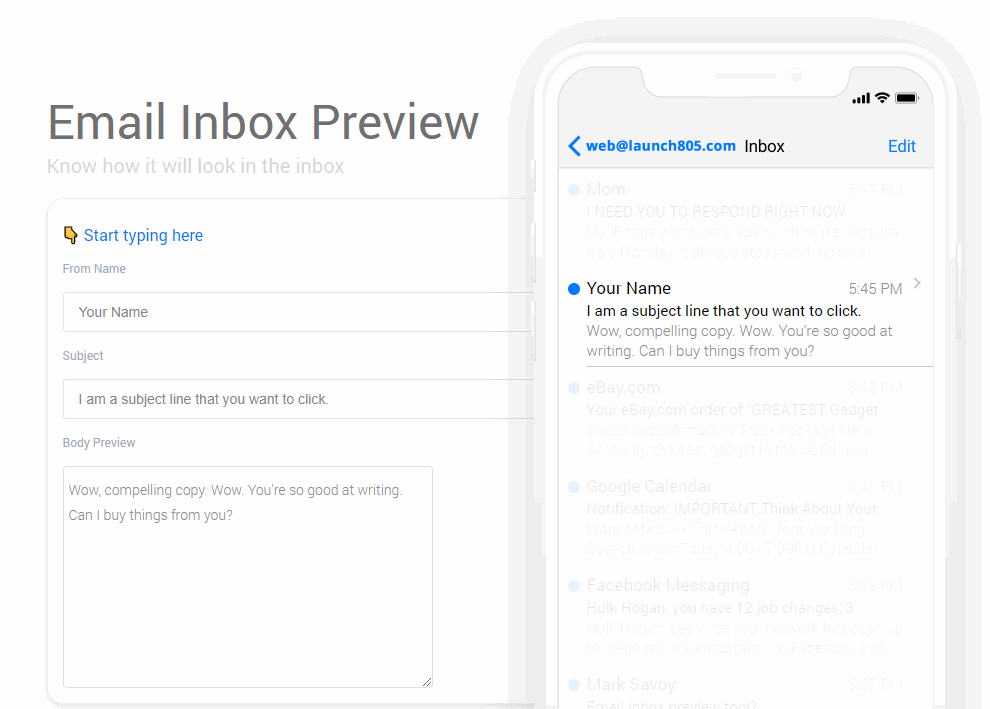
10. Use this inbox preview tool
Use this free tool that I created. I personally scripted an email subject line visualization tool to give both myself, and my clients a better idea of how the email subject line will look on mobile phones.
In mobile view, less characters are visible on the screen, hence, consider using that virtual real estate wisely!
Click the banner below to use the tool.
Finally, if your emails aren’t being opened, they aren’t being used. You’ve got great material to share; now it’s up to you to prove it in the subject line!