Dr. Marshall Rosenberg and Nonviolent Communication

Who is Dr. Marshall Rosenberg?

Note from Taylor Reaume: Dr. Marshall Rosenberg is one of my top 10 mentors. I was privileged to have the opportunity to meet him twice at workshops held in Santa Barbara. His model for compassionate communication is the most advanced and helpful system for processing internal thoughts I have ever found.

With a nation often on edge due to political and racial strife, students and communities trying to make their voices heard, and even families forced to quarantine together in close quarters, it has never been more important to learn to communicate without resorting to violence. Nonviolent Communication, or NVC, heightens awareness regarding the importance of communicating compassionately, verbalizing feelings, and understanding the differences between needs and requests vs. demands. I hope you enjoy these insights into his work.

A Worldwide Movement Begins

Dr. Marshall Rosenberg was an American psychologist, mediator, author and teacher known for developing the theory of Nonviolent Communication. He began formulating his insights during the civil rights and anti-war protests of the 1960s, and helped to peacefully desegregate long-separated school districts. From there, he went on to work as a global peacemaker and founded the Center for Nonviolent Communication (CNVC), an international non-profit organization. The NVC community is currently active in over 65 countries around the globe. According to the Center:

“NVC is based on the principles of nonviolence – the natural state of compassion when no violence is present in the heart. NVC begins by assuming that we are all compassionate by nature and that violent strategies—whether verbal or physical—are learned behaviors taught and supported by the prevailing culture.”

NVC assumes that we all share the same, basic human needs, and that all actions are a strategy to meet one or more of these needs. People who practice NVC have found greater authenticity in their communication, increased understanding, deeper connections, and enhanced conflict resolution. Applications can be seen in all sectors of society from the personal and professional to the political.

Groups such as educators, mental health and health care providers, managers, lawyers, police and prison officials, military officers, prisoners, clergy, government officials, and families have benefited from his teachings. He has provided training to promote the peaceful resolution of differences in areas fraught with war and economic disadvantages.

What is NVC?

Most of us want to improve the quality of our relationships, to deepen our sense of personal empowerment and to communicate more effectively. Unfortunately, though, we have been educated from birth to compete, judge, demand and diagnose; to think and communicate in terms of “right“ and “wrong.“ The habitual ways we think and speak tend to hinder communication and create misunderstanding. At their most extreme, our unfeeling habits can lead to anger, pain, and even violence.

NVC reaches beneath the surface and discovers what is alive and vital within us. It flows from the understanding that all of our actions are based on human needs we seek to fulfill. NVC provides a vocabulary of feelings and needs that help us more clearly express what is going on in us, and understand what is going on in others. When we understand and acknowledge our needs, we develop a shared foundation for much more satisfying relationships.
Dr. Marshall Rosenberg Non Violent Communication NVCC

Violent Communication vs. Nonviolent Communication

In its Key Facts About Nonviolent Communication, the CNVC describes violence as “acting in ways that result in hurt or harm.” Based on this definition, they believe that much of how we communicate – judging others, bullying, having racial bias, blaming, finger pointing, discriminating , speaking without listening, criticizing others or ourselves, name-calling, reacting when angry, using political rhetoric, being defensive or judging who’s “good/bad” or what’s “right/wrong” with people – could therefore be called “violent communication.”

Nonviolent Communication, on the other hand is the integration of four things:

  1. Consciousness: a set of principles that support living a life of compassion, collaboration, courage, and authenticity.
  2. Language: understanding how words contribute to connection or distance.
  3. Communication Skills: knowing how to ask for what we want, how to hear others even in disagreement, and how to move towards solutions that work for all.
  4. Means of Influence: sharing “power with others” rather than using “power over others.”

NVC serves our desire to increase our ability to live with choice, meaning, and connection; connect empathically with self and others to have more satisfying relationships; and share resources so everyone is able to benefit.

The Four Cornerstones of NVC

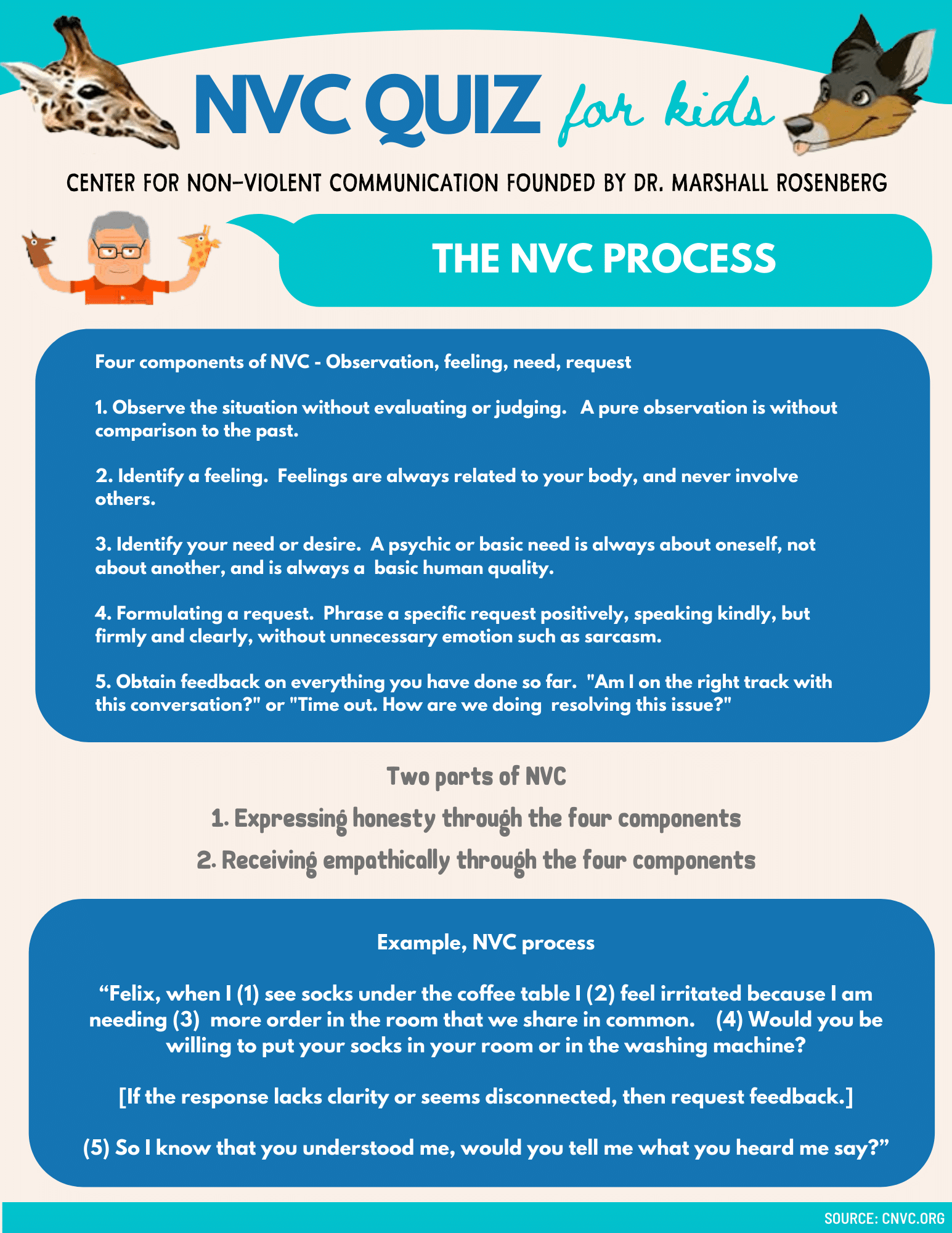
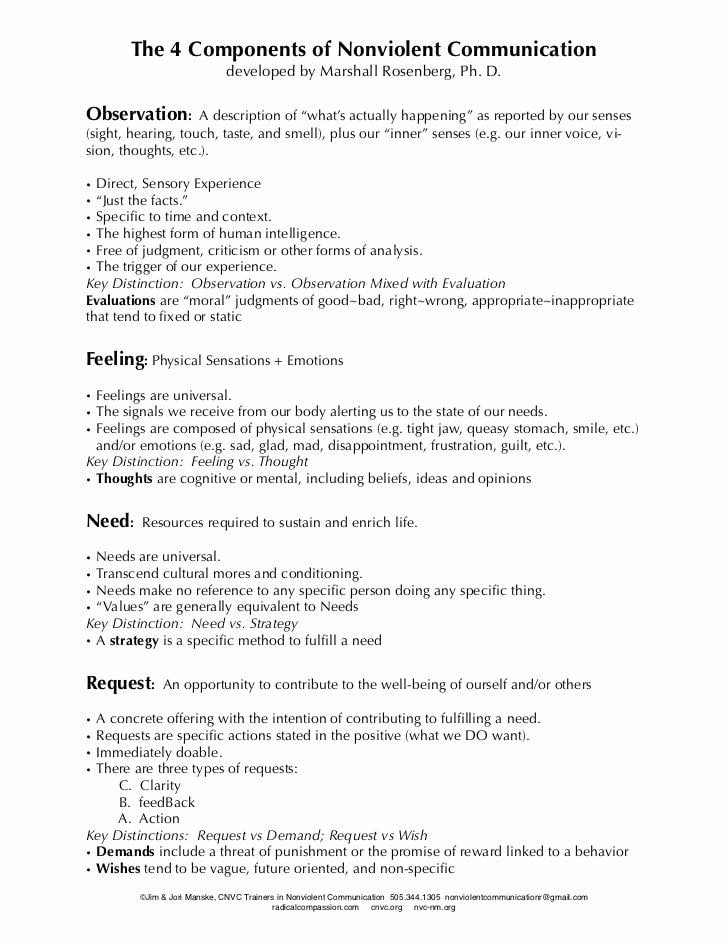
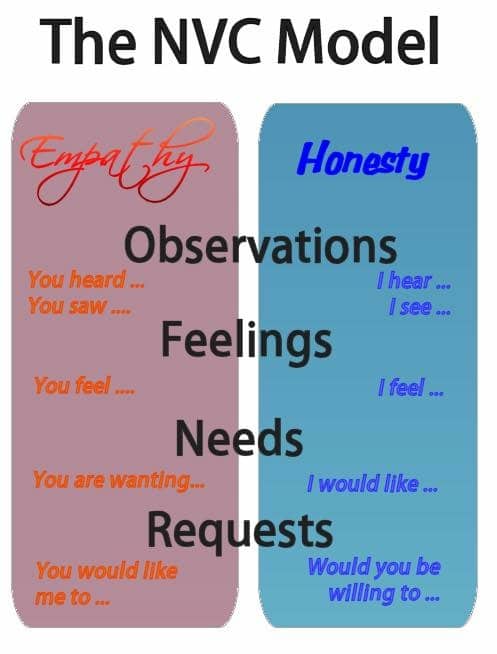
Most workshops, prior to Dr. Rosenberg’s time, tended to focus on conflict resolution as gaining power over other people. There was no recognition of individual qualities or affirmation of each other’s uniqueness, no compassion or nurturing. While violence usually results from such concepts as judgments, thoughts, strategies and demands, Rosenberg instead based NVC on four core components known as OFNR:

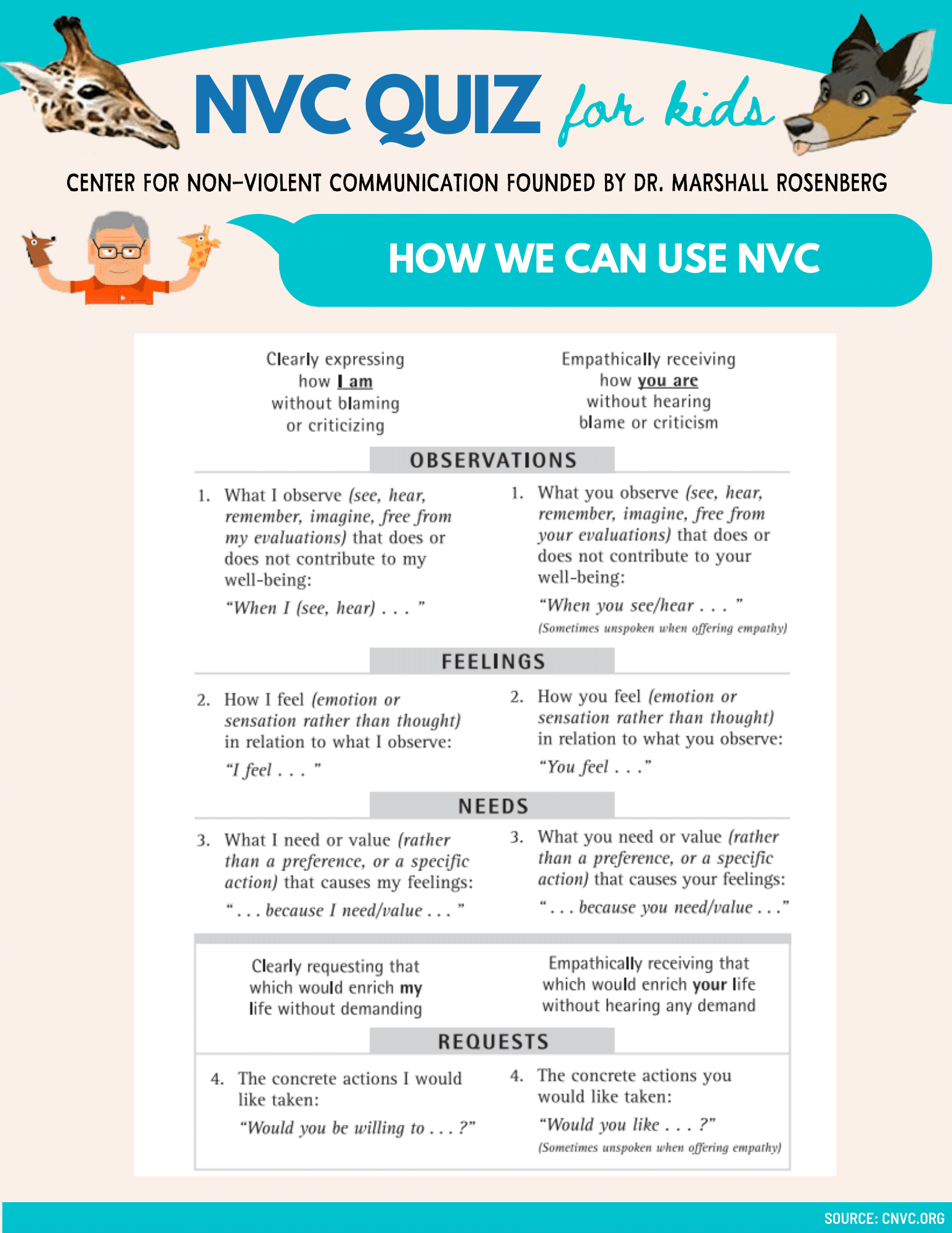
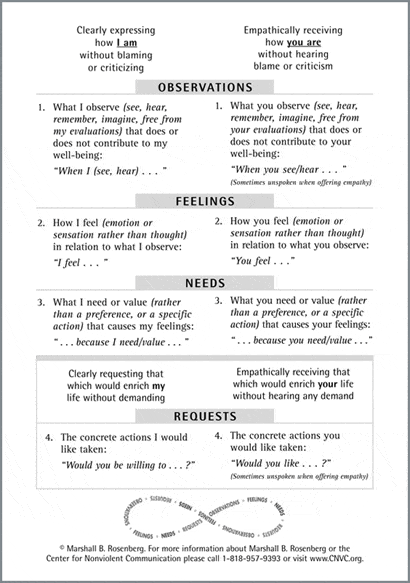
  • Observations: This is a description of what is actually happening, as reported by our direct, sensory experiences mixed with our “inner voice.” Observations should be free of moral judgment and criticism.
  • Feelings: These are the physical sensations and emotions which are universal to all people. It could be a sensation of fear, love, happiness, or guilt.
  • Needs/Values: These are the resources which are necessary to sustain our lives, and are also universal.
  • Requests: Requests are when one party has an opportunity to contribute to the well-being of another. It is a specific action which provides a concrete offering with the intention of helping to fulfill a need. Requests can come in the form of clarity, feedback and action.

How You Can Use the NVC Process

The life-changing benefits of NVC can be applied to conflict resolution, personal relationships, parenting and families, education, personal growth, organizational effectiveness, anger management, business relationships and individual spirituality.

NVC helps to develop your emotional vocabulary, connect with your feelings and needs, break negative habit patterns, hear the needs behind behavior and get to the heart of the conflict.

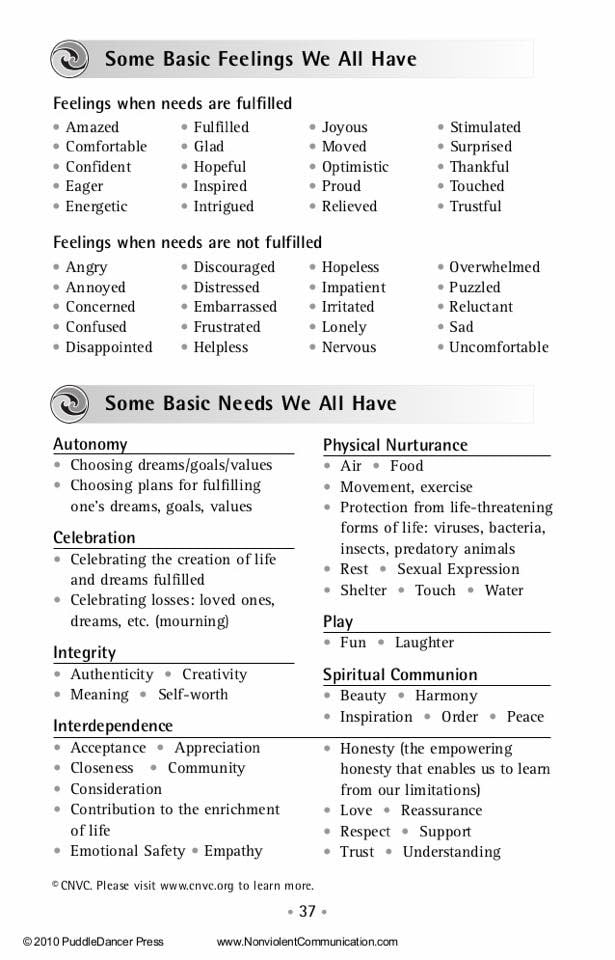
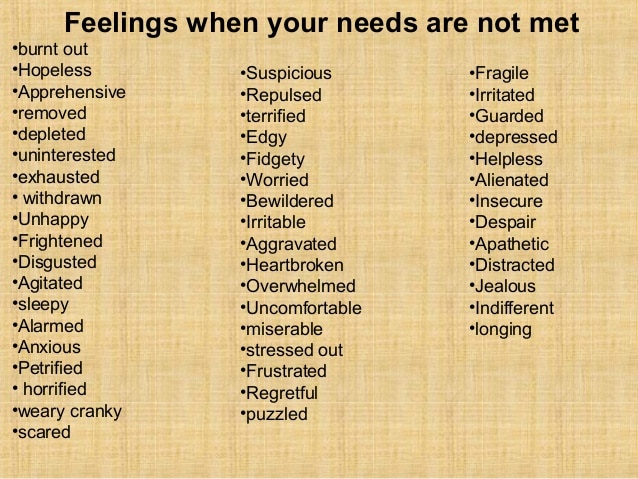
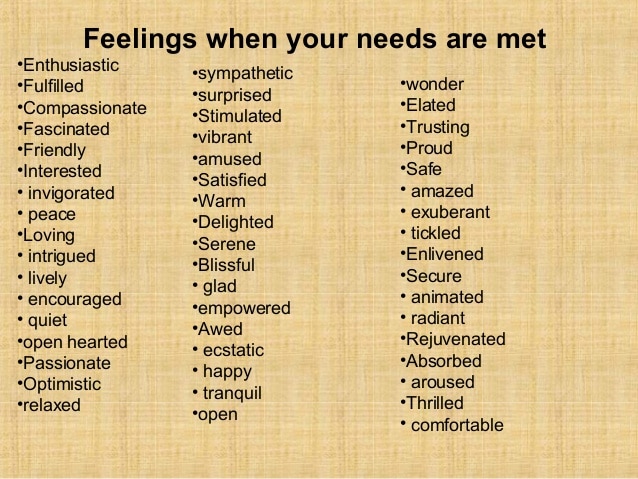
A good starting point is to learn how to use “feeling” words in a sentence. This way you can accurately describe how you are feeling to the other person.
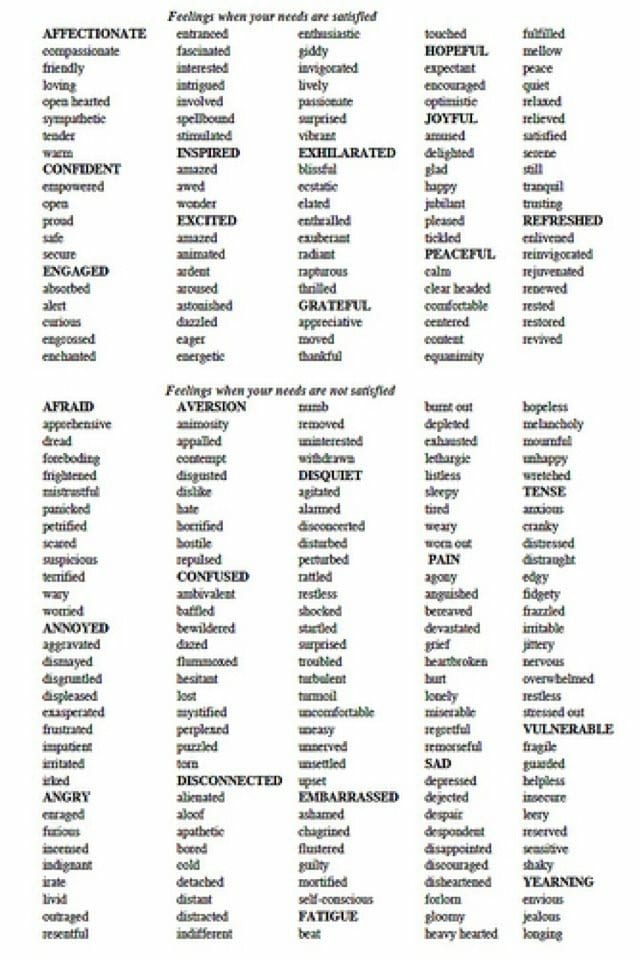
Feelings When Needs Not Met

Getting both people’s needs met involves accurately communicating how one feels about the needs being met or unmet.
Feelings When Needs Met

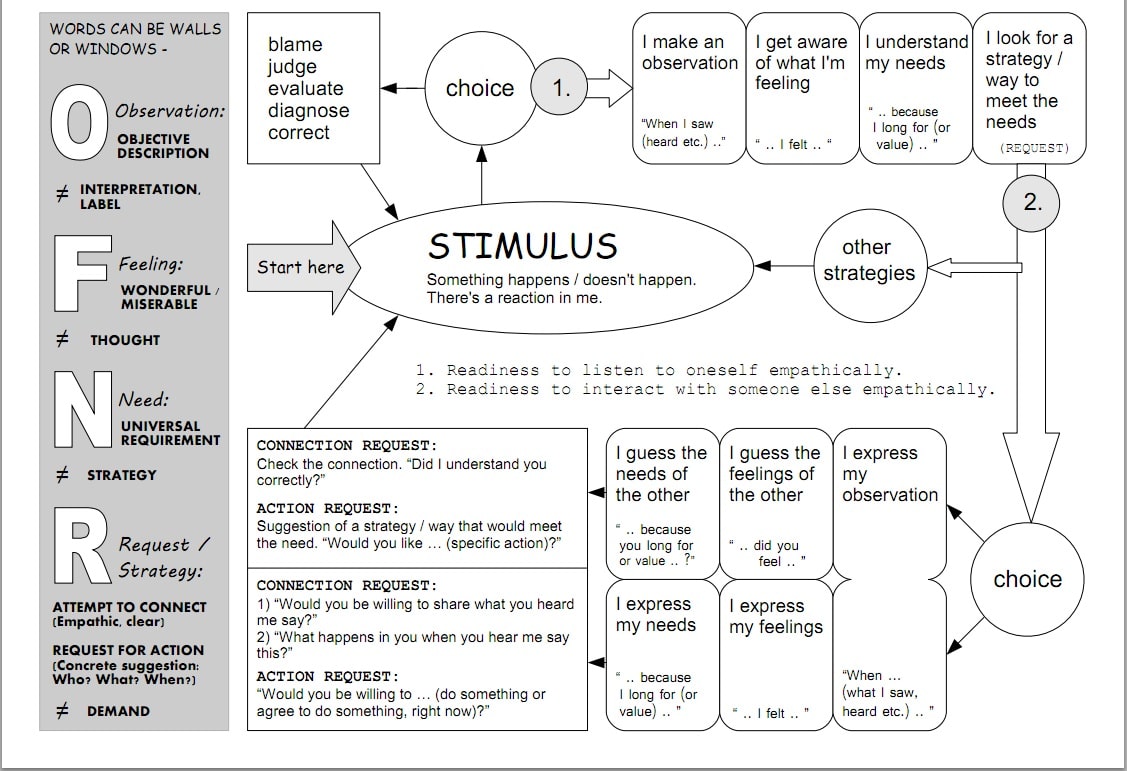
Here is a general outline of the entire communication model:
Dr. Marshall Rosenberg Non Violent Communication NVCC

Paraphrased Quotes from Dr. Marshall B. Rosenberg

“Every criticism, judgment, diagnosis, and expression of anger is the tragic expression on an unmet need.”

“The goal of Nonviolent Communication is not to alter people and their behavior to suit us; it is to establish relationships based on empathy and honesty, which will fulfill everyone’s needs eventually.”

“The more we discuss the past, the less we heal from it.”

“We can’t make anyone do anything against their will without enormous consequences.”

Below is a Youtube video of Dr. Marshall Rosenberg speaking to a group of psychologists. This was an NVC workshop in San Francisco, CA.

Although Dr. Rosenberg passed away in 2015, the Center he founded continues to educate people to communicate more effectively and become more connected globally. The world is definitely in a better place for the legacy he left us.

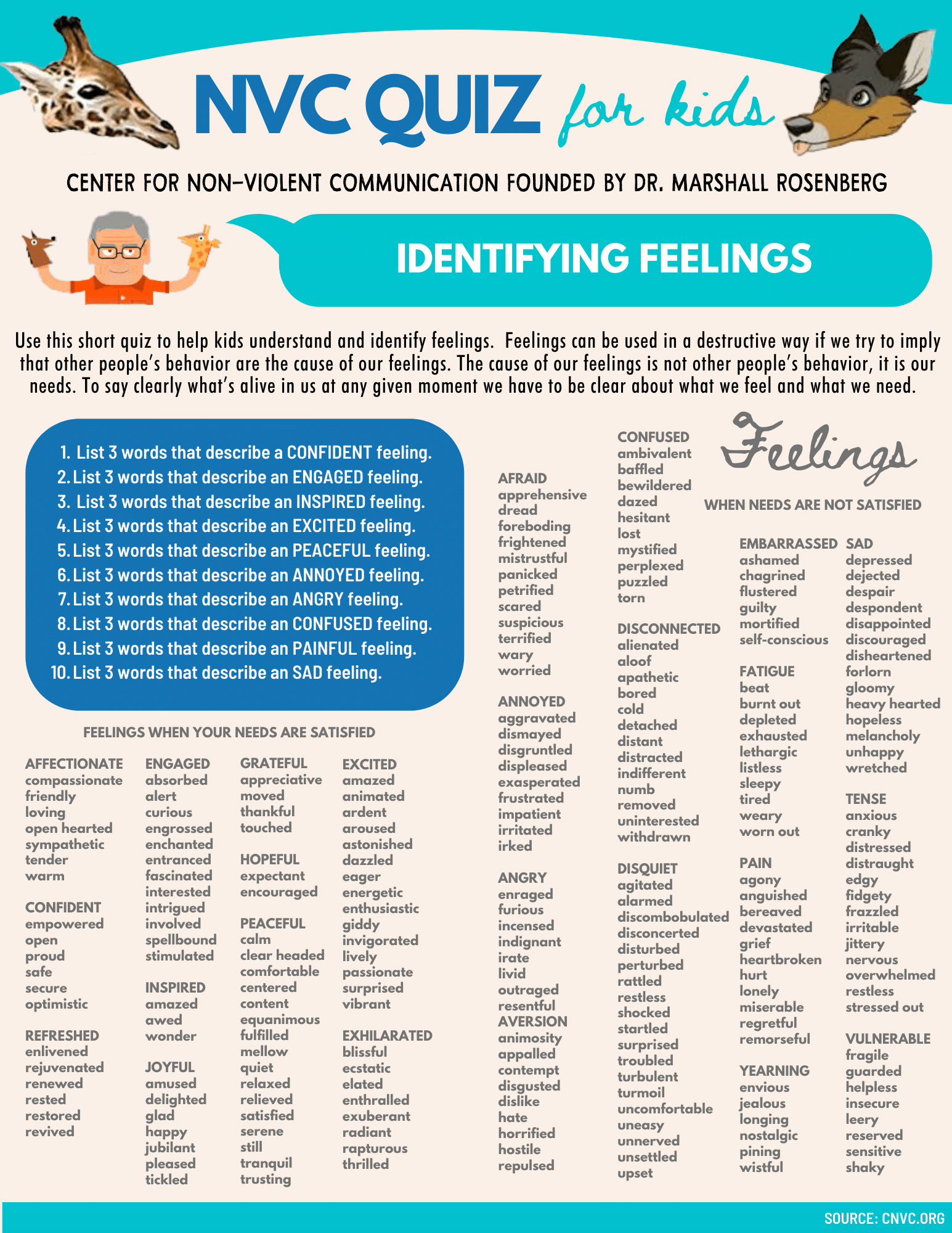
NVC QUIZ FOR KIDS: I stayed up until 4am designing these quiz sheets below. If you have kids, you might benefit from chatting with them about the answers.

I use these quizzes to annoy the crap out of my nephews and nieces when I see them. 🙂

They are designed to help children distinguish between feelings or thoughts, and requests or demands.
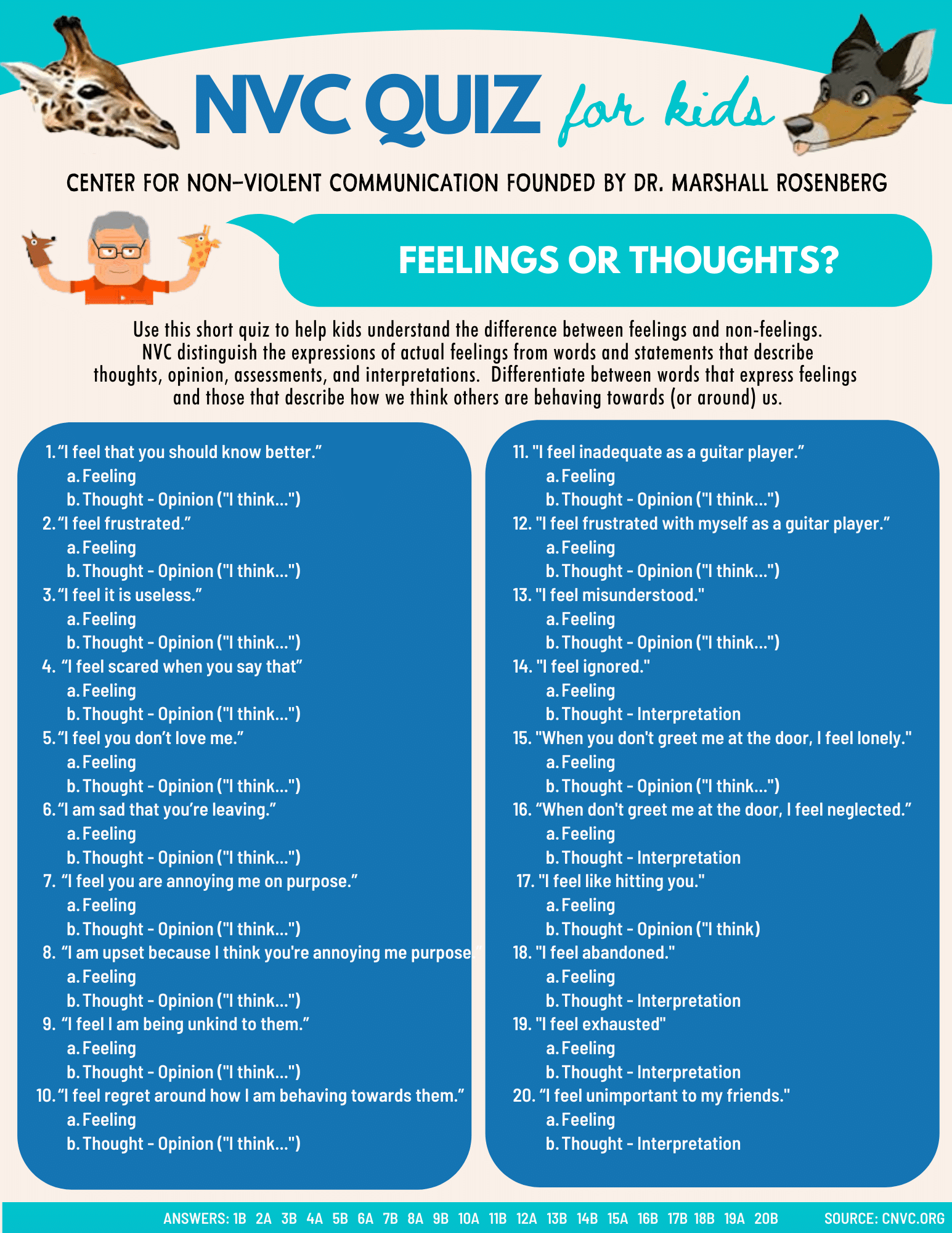
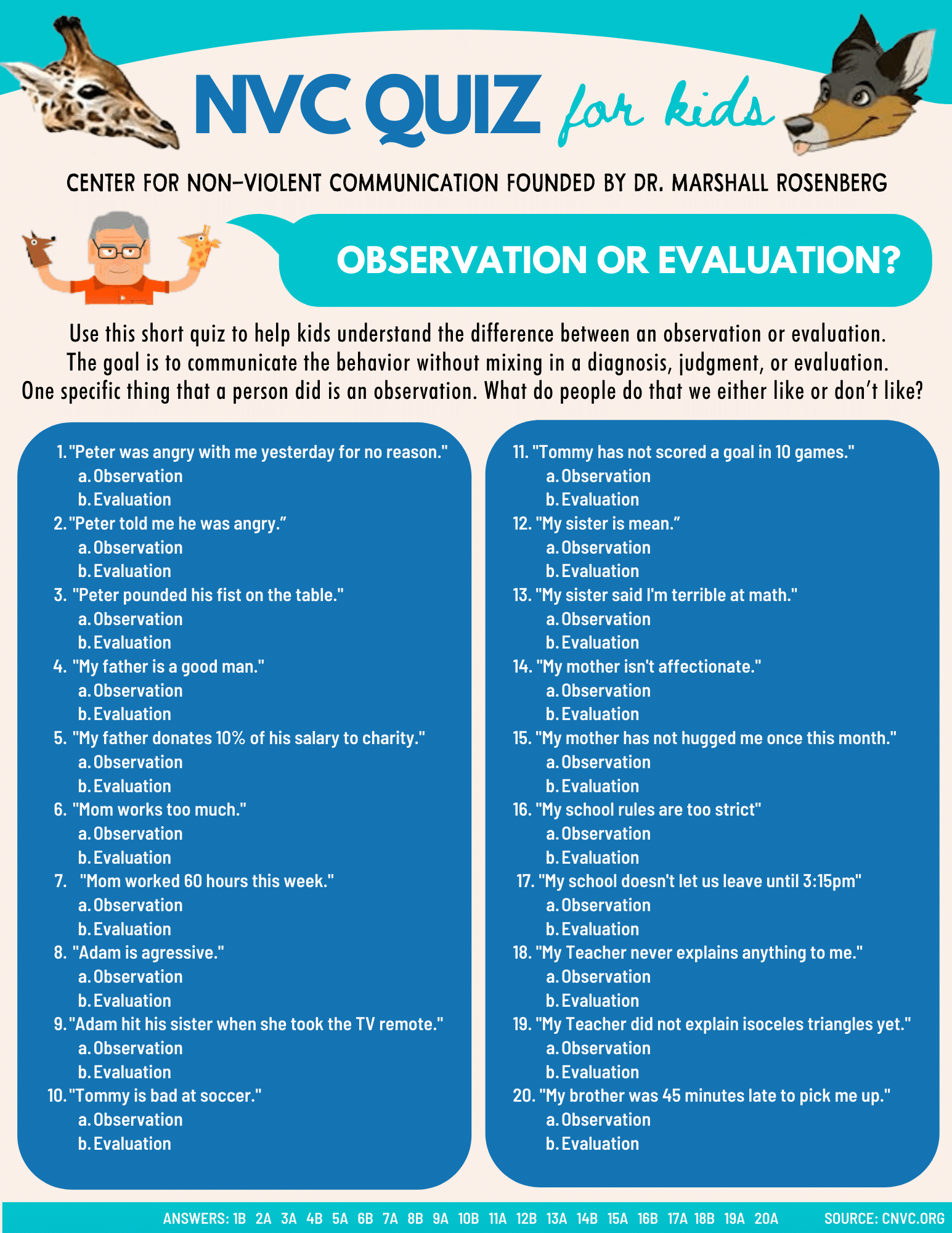
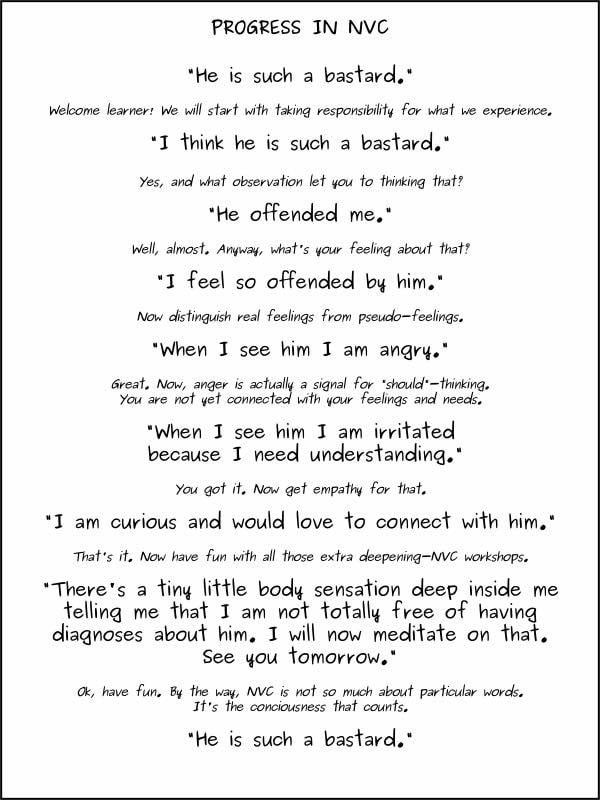
And finally, below is a collection of infographics I’ve collected over the years.
How To Build Your Email List

Build Email List

Email is sometimes seen as a lonely outcast in the online marketing world, sometimes even a joke. It just keeps plodding on behind the scenes whiles its flashier cousins get all the attention. Yet savvy marketers know that email is just as powerful now as it has always been, and deploy it as an integral part of their online strategy.

Email is the perfect way to promote your products and services, distribute interesting content, and stay in touch with prospects and customers. Carefully targeted, automated “drip” campaigns that provide information without becoming spam can take your business from an interesting idea to a possible partner in the recipient’s mind.

Here are some eye-popping email statistics to give you a better perspective:

  • The number of email users continues to grow: Statista reports that there were over 4 billion email users worldwide in 2020. This number is expected to grow to almost 4.6 billion by 2025.
  • Emails get opened: In 2020 email benchmarks for all industries included an average open rate of 18.0%, an average click-through rate of 2.6%, and an average click-to-open rate of 14.1%.
  • They influence purchase decisions: According to consumer research, 59% of respondents say marketing emails influence their purchase decisions.
  • Emails get results: Even in 2019, the ROI on email marketing campaigns was over $40! How does that compare to direct mail or your other online efforts?
Email List Building Tactics

Why do people unsubscribe?

Why am I starting this blog with “how to keep your list” instead of “how to build your list”? Because keeping your list is probably the most effective way to “build your list”.

It’s similar to the age old money principle; “It’s much easier to make money, that it is to keep it.”

So how do we keep our email list subscribers from opting out?

To answer that question, let’s examine sending frequency.

Research firm Marketing Sherpa surveyed the opinions of 2,000 Americans about what frequency they think is optimal for newsletters. The diagram above shows how the survey participants answered the question:

“How often would you like to receive newsletters (coupons, promotions) from the companies you’re subscribed with?”

unsubscr11

Too frequent mailings are a sure way to lose subscribers. Your subscribers may unsubscribe simply because the emails they receive overload their inboxes. Just look at the huge selection of email customization tools that demonstrate the need for users to manage and reduce the number of emails they receive.

What is a normal unsubscribe rate?

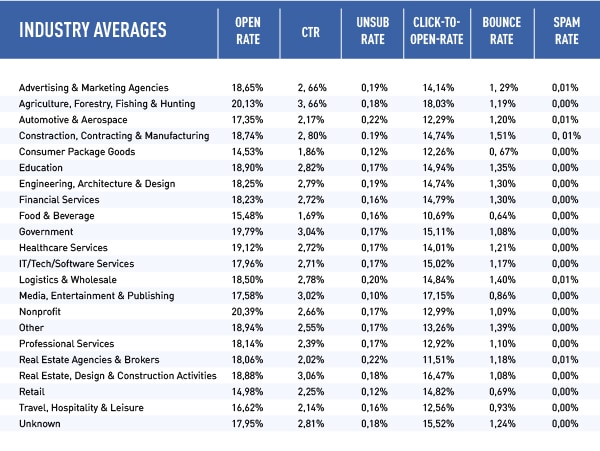
There is no official percentage benchmark for the unsubscribing norm. It depends on each mailing campaign and the industry. That said, below is a table of industry averages which you might find interesting:

Email List Open Rates and Industry Averages

According to the Campaign Monitor research, the average unsubscribe rate in 2019 was about 0.17%. From 1000 letters sent – 1-2 people unsubscribe.

As long as the number of unsubscribes does not exceed 0.5%, everything is pretty normal. If your base is 200 subscribers, then with each submission at least one of them will unsubscribe. It’s sad, but true.

Segment your email list to lower unsubscribes.

The best way to lower the number of unsubscribes from your mailings is to segment your database. There are many different ways to do this:

  • which links are clicked when they receive your email;
  • which online resources are used (e-books, webinars, etc.);
  • whether they participate in online events or not (webinars, for example);
  • how often your emails are opened (frequency of interaction);
  • where subscribers live;
  • income level, psychographic data, etc.

The statistics prove the reliability of email marketing, but their effectiveness relies on the quality of your email list. Careful attention needs to be paid to adding addresses to your list, updating them as needed, sending quality content and promptly responding to unsubscribe requests.

Let’s talk about building your email list.

Probably the best way to build your email list is with a “give to get” opt in strategy.

Offer potential customers a white paper, or an infographic, in exchange for subscribing to your newsletter list. Their email goes into your database automatically, and generates a series of welcome, thank you, or content updates.

Most people jealously guard their email address because they don’t want to get on some type of “spam” list. But they do want to get worthwhile information and offers from companies that match their interests. So what can you offer that makes your company look good, and still adds value to your prospective customer?

Email List Building Tactics

Below are several creative ways you might consider building your list:

  1. Add an email opt-in form to your website: This one is simple – just ask your website visitors to subscribe to your monthly online newsletters. Once they sign-up, be sure to only send relevant, interesting content that meets their needs, though, or they might unsubscribe quickly. Make sure this offer is repeated on every page your visitors might access from their online search results.
  2. Use pop-ups: These are quick hits that grab a user’s attention as they begin to surf your site. Have a headline that promises something, offer a discount, or have a limited time offer. Make it very simple to fill in the email and leave it at that.
  3. Ask on social media: There are many creative ways to get emails from people on social media. “Give to get” email opt-in strategies are a common way to build an email list using social media. You can offer a PDF or white paper in exchange for an email address. You can use Facebook, or do a call-to-action Tweet or post on Instagram.
  4. Check-out process: If you offer ecommerce services, you can always ask for an email address during the checkout process. Most people don’t think twice about providing an email to a company they trusted enough to make a purchase.
  5. Insider Tips: Put together a one page sheet of special tips that apply to your product or service, and offer it in exchange for an email address.
  6. White Paper: A white paper is a deep dive into a topic of particular interest. If you own a computer store for example, a good white paper might look at various computer setups to achieve maximum office efficiency. The white paper seeks to take a complex matter and break it down with expert advice and research. It provides useful information that can help solve a particular problem, and maybe even motivate the reader to work further with your company.
  7. E-book: This is a more in-depth study of a particular topic. It might come in handy for analyzing many sides of a particular issue or product offering.
  8. Special Access: Offer to let prospects on your email list have sneak previews of new products or upcoming sales and promotions. Have a limited sale period that is available only to this list before you open it to everyone.
  9. Helpful Audio or Video: Is there one topic that you are always explaining to customers? You can reproduce your answer in the form of an audio or video file, and offer that as the email address incentive.
  10. Surveys: Ask someone to provide answers to a few questions about your product or service. Offer to provide results if they give you their email address.
Email List Building Tactics

Case Studies on Building Email Lists

  • Buffer, the marketing software firm, shared its strategies to double email signups in 30 days. They added eight more ways to their existing tactic, to make it ridiculously easy to sign-up for the list. Options now include slideup form, blog homepage email capture, HelloBar, sidebar ad, postscript CTA, Twitter lead generation cards, Facebook newsletter signup, SlideShare, and Qzzr.
  • University of Alberta realized a 500% increase in subscribers simply by adding a chat window signup with Qualaroo. Even though their website page offered a newsletter preview, few visitors took the opportunity to actually sign-up. A pop-up chat window, however, noted their interest and provided a quick way to enter an email address.
  • Sol de Janeiro, a body care company, generated 25,000 new subscribers in under five months using a layered lead capture approach that began with an offer that triggered when a prospect appeared to be ending a website session.

Automate Your Email Automation

Create specific emails to respond to certain situations, and set up your system to send them out automatically. You might have emails already created to:

  • Accompany the white paper or other information you are sending.
  • Follow-up on information that was sent
  • Welcome a new customer
  • Connect with someone you haven’t heard from lately
  • Send out to those with an abandoned cart
  • Celebrate milestone occasions

Use productivity tools like Constant Contact, Mailchimp or Cloud HQ to automatically schedule emails, update your database, respond to unsubscribe requests, and handle your automatic reply needs.

Start Building Your Email List Today

When you are building your email list, think about the emotions you want readers to feel. Try to put yourself in their position to see what would make you give someone your email address, and build from there.

Do you have a coveted email opt in strategy that’s worked for you in the past? Well don’t keep it a secret, that’s no fun! I’d love to hear your thoughts in the comments below.

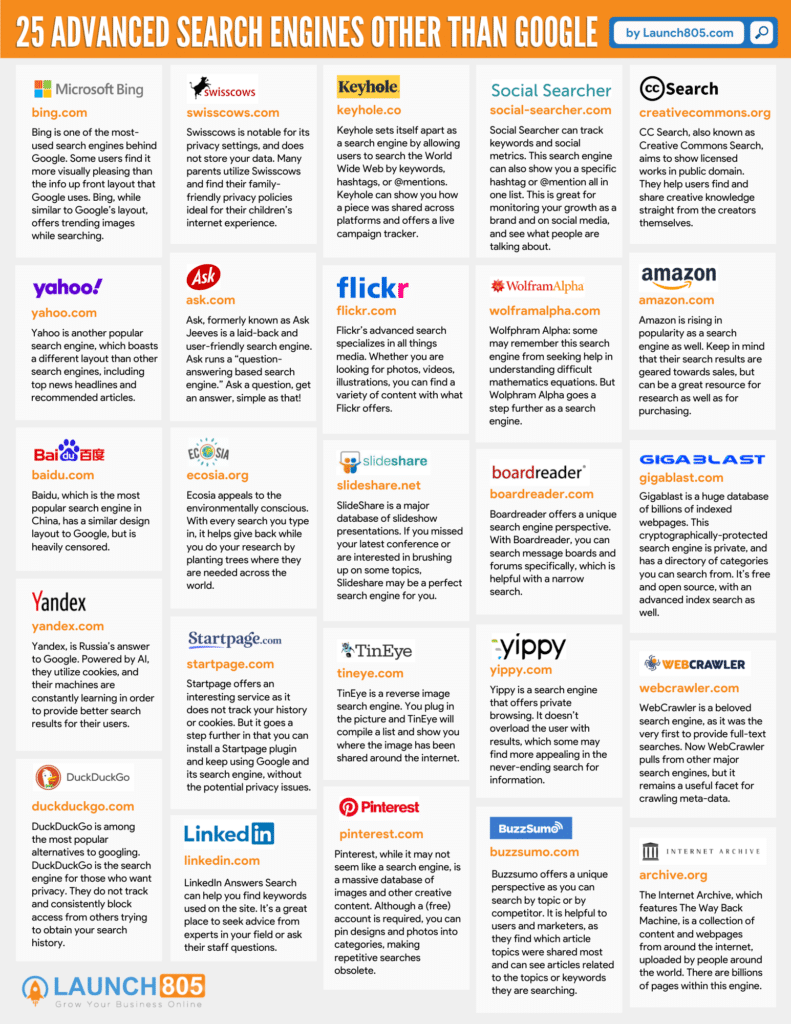
25 Advanced Search Engines (Other Than Google)

Advanced Search Engines 1

It may come as a shock to learn that Google is not the end-all be-all search engine. There are many search engines out there, much more than the 25 included in this list.

Learning how Google stores and utilizes the information you search for may lead to seeking out a different, more private search engine.

Which search engine is right for you? It depends on what you are searching for and what you are interested in finding.

Are privacy and tracking options important to you? Are you looking for academic material or strictly for video clips? The search engines you use can help better define your search, and get you the answers you need more quickly.

Thankfully, you have options! Keep reading to find which search engine best fits your needs.

25 Advanced Search Engines (Other Than Google)
  1. Bing is one of the most-used search engines behind Google. Some users find it more visually pleasing than the info up front layout that Google uses. Bing, while similar to Google’s layout, offers trending images while searching.
  2. Yahoo is another popular search engine, which boasts a different layout than other search engines, including top news headlines and recommended articles.
  3. Baidu, which is the most popular search engine in China, has a similar design layout to Google, but is heavily censored.
  4. Yandex is Russia’s answer to Google. Powered by AI, they utilize cookies, and their machines are constantly learning in order to provide better search results for their users.
  5. DuckDuckGo is among the most popular alternatives to googling. DuckDuckGo is the search engine for those who want privacy. They do not track and consistently block access from others trying to obtain your search history.
  6. Swisscows is notable for its privacy settings, and does not store your data. Many parents utilize Swisscows and find their family-friendly privacy policies ideal for their children’s internet experience.
  7. Ask.com formerly known as Ask Jeeves is a laid-back and user-friendly search engine.  Ask runs a “question-answering based search engine.”  Ask a question, get an answer, simple as that!
  8. Ecosia appeals to the environmentally conscious. With every search you type in, Ecosia helps give back while you do your research by planting trees where they are needed across the world. They are privacy-friendly and utilize Bing and their own algorithms to bring you your results.
  9. Startpage offers an interesting service as it does not track your history or cookies. But it goes a step further in that you can install a Startpage plugin and keep using Google and its search engine, without the potential privacy issues.
  10. Pinterest, while it may not seem like a search engine, is a massive database of images and other creative content. Although a (free) account is required, you can pin designs and photos into categories, making repetitive searches obsolete.
  11. Keyhole sets itself apart as a search engine by allowing users to search the World Wide Web by keywords, hashtags, or @mentions. Keyhole can show you how a piece was shared across platforms and offers a live campaign tracker. Keyhole utilizes social listening online and provides analytics to help improve your online marketing strategies.
  12. Flickr’s advanced search specializes in all things media. Whether you are looking for photos, videos, illustrations, you can find a variety of content with what Flickr offers.
  13. SlideShare is a major database of slideshow presentations. If you missed your latest conference or are interested in brushing up on some topics, Slideshare may be a perfect search engine for you.
  14. TinEye is a reverse image search engine. You plug in the picture and TinEye will compile a list and show you where the image has been shared around the internet.
  15. LinkedIn Answers Search can help you find keywords used on the site. It’s a great place to seek advice from experts in your field or ask their staff questions.
  16. Social Searcher can track keywords and social metrics. This search engine can also show you a specific hashtag or @mention all in one list. This is great for monitoring your growth as a brand and on social media, and see what people are talking about.
  17. Wolfphram Alpha: some may remember this search engine from seeking help in understanding difficult mathematic equations. But Wolphram Alpha goes a step further as a search engine. The website offers expert knowledge in a variety of fields, and is a hub of helpful videos and examples to explain any question you may have. It is privately owned and doesn’t track your searches.
  18. Boardreader offers a unique search engine perspective. With Boardreader, you can search message boards and forums specifically, which is helpful with a narrow search.
  19. Yippy is a search engine that offers private browsing. It doesn’t overload the user with results, which some may find more appealing in the never-ending search for information.
  20. Buzzsumo offers a unique perspective as you can search by topic or by competitor. This search engine is helpful to users and marketers, as they find which article topics were shared most and can see articles related to the topics or keywords they are searching.
  21. CC Search, also known as Creative Commons Search, aims to show licensed works in public domain. They help users find and share creative knowledge straight from the creators themselves. If you or your company want to avoid copyright claims, using CC Search may work for you.
  22. Amazon is rising in popularity as a search engine as well. Keep in mind that their search results are geared towards sales, but can be a great resource for research as well as for purchasing.
  23. Gigablast is a huge database of billions of indexed webpages. This cryptographically-protected search engine is private, and has a directory of categories you can search from. It’s free and open source, with an advanced index search as well.
  24. WebCrawler is a beloved search engine, as it was the very first to provide full-text searches. Now WebCrawler pulls from other major search engines, but it remains a useful facet for crawling meta-data.
  25. The Internet Archive which features The Way Back Machine, is a collection of content and webpages from around the internet, uploaded by people around the world. There are billions of pages within this engine.

Privacy concerns are not the only reason users may seek out other advanced search engines other than Google. Some users have a more specific search request or want to search a database without the possibility of copyright claims.

From Swisscows, known for its privacy settings, to TinEye, an advanced image search engine, there are many search engines that hold their own against Google, by offering niche or advanced features.

Really it comes down to which search engine best suits your needs.

Which search engine is your favorite and why? Let me know in the comments below!