Help Influence And Understand How Your Products Appear On Google

Shoppers turn to Google to find products that are just right for them. And you rely on Google Manufacturer Center to ensure your products are represented well. In fact, more than 5,000 brands use Manufacturer Center to improve their presence on Google. To kick off the new year, we’re making those interactions even better by introducing new ways to show high-quality and inspirational content to shoppers and providing robust analytics to help you better understand how customers are interacting with your brands and products across all of Google.

A new place to inspire shoppers and promote your products

Shoppers are constantly looking for inspiration and assistance on what to buy. In a Google study of ~1,600 people, we found that 56 percent of smartphone users have purchased from an unexpected brand when they considered the brand helpful. To help you assist your customers and highlight your product’s unique features, we’re launching a new section on Shopping product detail pages, featuring content directly from you.

You’ll be able to:

  • Populate your product pages on the Google Shopping property with inspirational and high quality content.
  • Highlight the product features and capabilities that you know your shoppers care about the most.
  • Build brand equity directly with shoppers on Google (Google remains the first place shoppers go to get helpful recommendations and suggestions on what to buy according to an online survey of ~2,700 recent online shoppers).

As our first launch partner, Syndigo (formerly Webcollage) is providing this content for eligible manufacturers’ products. Across the web, Syndigo has seen 10 percent more conversions for their clients when more visual content is shown at retailers based on an A/B test. In the coming months, all manufacturers who upload content like inspirational imagery and high quality logos into Manufacturer Center will also be able to provide these more visual experiences to help shoppers.

If you’re a data partner who wants to bring this experience on Google to your clients, let us know here.

Make better business decisions with new insightful analytics

To help you make better business decisions, we’ve also launched new and improved analytics in Manufacturer Center that will provide you a better understanding of how ads for your products are performing on Google. You will learn how ads for your products appear, so you can make better pricing, digital ad investment, and media decisions. You’ll find:

  • Performance trends like top performing product groups and significant changes in performance or price.
  • Insights on product variants like top search terms for your products and average price trends.
  • Product group stats like which competitor’s brands and products appear most often with yours.

These new analytics are available to all brands in Manufacturer Center that meet eligibility requirements.

Manufacturer Center availability expands

In 2018, we’ve expanded Manufacturer Center availability from seven countries to 24 countries. Now, if you sell products in these countries, you can better represent your products to shoppers, improve the performance of Shopping ads featuring your products, and access these new, more helpful analytics. We hope these updates will help shoppers find the products perfect for them and help you better connect with your customers. To learn more about Manufacturer Center, to read success stories, and to sign up, visit our website.

Source: Official Google Webmasters Blog

Putting Machine Learning Into The Hands Of Every Advertiser

The ways people get things done are constantly changing, from finding the closest coffee shop to organizing family photos. Earlier this year, we explored how machine learning is being used to improve our consumer products and help people get stuff done.

In just one hour, we’ll share how we’re helping marketers unlock more opportunities for their businesses with our largest deployment of machine learning in ads. We’ll explore how this technology works in our products and why it’s key to delivering the helpful and frictionless experiences consumers expect from brands.

Deliver more relevance with responsive search ads

Consumers today are more curious, more demanding, and they expect to get things done faster because of mobile. As a result, they expect your ads to be helpful and personalized. Doing this isn’t easy, especially at scale. That’s why we’re introducing responsive search adsResponsive search ads combine your creativity with the power of Google’s machine learning to help you deliver relevant, valuable ads.

Simply provide up to 15 headlines and 4 description lines, and Google will do the rest. By testing different combinations, Google learns which ad creative performs best for any search query. So people searching for the same thing might see different ads based on context.

We know this kind of optimization works: on average, advertisers who use Google’s machine learning to test multiple creative see up to 15 percent more clicks.1

Responsive search ads will start rolling out to advertisers over the next several months.

Maximize relevance and performance on YouTube

People watch over 1 billion hours of video on YouTube every day. And increasingly, they’re tuning in for inspiration and information on purchases large and small. For example, nearly 1 in 2 car buyers say they turn to YouTube for information before their purchase.2 And nearly 1 in 2 millennials go there for food preparation tips before deciding what ingredients to buy.3 That means it’s critical your video ads show at the right moment to the right audience.

Machine learning helps us turn that attention into results on YouTube. In the past, we’ve helped you optimize campaigns for views and impressions. Later this year, we’re rolling out Maximize lift to help you reach people who are most likely to consider your brand after seeing a video ad. This new Smart Bidding strategy is also powered by machine learning. It automatically adjusts bids at auction time to maximize the impact your video ads have on brand perception throughout the consumer journey.

Maximize lift is available now as a beta and will roll out to advertisers globally later this year.

Drive more foot traffic with Local campaigns

Whether they start their research on YouTube or Google, people still make the majority of their purchases in physical stores. In fact, mobile searches for “near me” have grown over 3X in the past two years,4 and almost 80 percent of shoppers will go in store when there’s an item they want immediately.5 For many of you, that means driving foot traffic to your brick-and-mortar locations is critical—especially during key moments in the year, like in-store events or promotions.

Today we’re introducing Local campaigns: a new campaign type designed to drive store visits exclusively. Provide a few simple things—like your business locations and ad creative—and Google automatically optimizes your ads across properties to bring more customers into your store.

Local campaigns will roll out to advertisers globally over the coming months.

Get the most from your Shopping campaigns

Earlier this year, we rolled out a new Shopping campaign type that optimizes performance based on your goals. These Smart Shopping campaigns help you hit your revenue goals without the need to manually manage and bid to individual products. In the coming months, we’re improving them to optimize across multiple business goals.

Beyond maximize conversion value, you’ll also be able to select store visits or new customers as goals. Machine learning factors in the likelihood that a click will result in any of these outcomes and helps adjust bids accordingly.

Machine learning is also used to optimize where your Shopping ads show—on Google.com, Image Search, YouTube and millions of sites and apps across the web—and which products are featured. It takes into account a wide range of signals, like seasonal demand and pricing. Brands like GittiGidiyor, an eBay company, are using Smart Shopping campaigns to simplify how they manage their ads and deliver better results. GittiGidiyor was able to increase return on ad spend by 28 percent and drive 4 percent more sales, while saving time managing campaigns.

We’re also adding support for leading e-commerce platforms to help simplify campaign management. In the coming weeks, you’ll be able to set up and manage Smart Shopping campaigns right from Shopify, in addition to Google Ads.

Source: Official Google Webmasters Blog

New Innovations Remove Friction From Discovering Products In-Store And Online

Driven by rapid changes in technology and mobile, consumer expectations continue to rise at an unrelenting pace. There are brand new ways for people to find and engage with businesses, and it’s becoming critical for marketers to remove friction at every step of the consumer journey. This morning at Search Marketing Expo Advanced, we made three announcements for marketers and retailers including:

1. New innovations to highlight your physical locations

Almost 80% of shoppers will go in-store when they have an item they want immediately.1 To help capture this demand, we’re expanding affiliate location extensions to video campaigns on YouTube– on top of Search and Display campaigns. This helps brand manufacturers drive and measure foot traffic to nearby retail stores and auto dealers that sell their products. We’ve seen that adding affiliate location extensions to TrueView in-stream and bumper ads can increase the clickthrough rate by over 15%.2

New local catalog ads on Display will also roll out to all advertisers by the end of the month to help shoppers discover what you sell, then visit your store. One-third of shoppers say finding inspiration is something they enjoy most about shopping.3 This interactive experience highlights a hero image and your inventory in an easy-to-scroll, mobile layout that helps shoppers explore your products. It also features in-store availability and detailed pricing information. This new format can complement your traditional print campaigns – including catalogs, flyers, and circulars – with the added audience and measurement benefits of digital ads.

Boulanger is one of the largest electronics and appliances retailers in France. The retail brand had a special promotional event for Spring 2018, so it turned to local catalog ads to boost its sales. Boulanger showcased a cheerful lifestyle image, a message welcoming the season and products carefully curated for local in-store promotion. With help from both click-based and impression-based store visits* (launched in March), the campaign drove over 20K visits to its stores, delivering a return of 42 times its investment on ad spend.

*Store visits are estimates based on aggregated, anonymized data from a sample set of users who have turned on Location History.

Onboarding to both local catalog ads and local inventory ads is now much easier for retailers of all sizes with the new local feed partnership program. The new program allows point-of-sale or inventory data providers, like CayanPointyLinx, and receipts, to provide sales and inventory data to Google on behalf of merchants, so they don’t have to create their own local product feeds. As an additional benefit, retailers can showcase their local inventory for free on the “See What’s In Store” feature on the search knowledge panel.

2. Competitive pricing insights to help deliver better sales results

Beyond availability of products in store, we know that price is also a top consideration for consumers. New price benchmarks in AdWords reporting will be available soon to show Shopping advertisers how other retailers are pricing the same products. You can use these pricing insights to inform your bidding strategy when you have price-competitive products to promote, to influence pricing strategy with your merchandising teams, or to troubleshoot performance drops due to competitors’ pricing.

For example, let’s say you find that you’re selling a sweater for $40 while most retailers are selling the same sweater for $60. You may choose to bid upon this sweater because your product is more price-competitive in the current market and will appeal to more potential customers.

3. Updates for our Shopping Actions program

Consumers continue to be open to new ways of discovering and buying products. Today at SMX Advanced, we shared an update on Shopping Actions, the program we launched in March to give consumers an easy way to complete the purchase from retailers, while on Google platforms like Search, the Assistant, or by voice.

Since its launch, thousands of retailers have requested to join through our interest form, and more than 70 retailers are live on the program today. Early testing indicates that participating retailers on average see an increase in total clicks and conversions at a lower overall cost per click and conversion, compared to running Shopping ads alone.4

As always, SMX Advanced is an exciting event that brings leading marketers together. We hope you’ll join us in our Learn with Google Classroom to connect and hear more about how these new products can help you grow your business.

Source: Official Google Webmasters Blog
Google Manufacturer Center Rolls Out International Expansion, API Updates, And New Content Discovery Opportunities To Help You Better Showcase Your Brand Online

With the launch of self-sign up earlier this year, thousands of top brands and manufacturers have already begun using Google Manufacturer Center to enhance their product’s images, descriptions, and variants in Shopping ads. Today, we’re excited to announce new ways to help brands — both in the US and abroad — manage their data more easily and provide a more consistent brand experience on Google and across the web.

Manufacturer Center expands to more countries

To help brands abroad, we’ve expanded availability for Manufacturer Center to the United Kingdom, Australia, Germany, France, Brazil, and the Netherlands. Now, brands with products sold in these markets can use Manufacturer Center to best represent their products to shoppers, access unique analytics and insights, and improve the performance of Shopping ads featuring their products.

Increase opportunities to highlight your products’ best features and benefits

Shoppers are constantly looking for information, trying to ensure the product they ultimately choose is the perfect fit for their needs. Information from Manufacturer Center now appears in Google Knowledge Panels in the US, highlighting core product features to shoppers at key decision-making stages. With descriptions, images, features, and more directly supplied by you, the manufacturer, shoppers will be better informed and feel more confident choosing your branded products.

Manage product information programmatically with the Manufacturer Center API

We know that manually uploading, editing, deleting, and distributing product data can make it difficult to keep up with a brand’s ever-changing product assortment, and using feeds may not offer the desired level of control. With the launch of the Manufacturer Center API, brands (or their 3rd party data partners) can streamline product data updates in the following ways:

  • Add new products directly to Manufacturer Center.
  • Update existing products in Manufacturer Center with the most current product data.
  • Delete products from an existing Manufacturer Center account.
  • Monitor data quality and review product data errors to optimize a brand’s presence on Google.
  • Surface Google’s product data feedback in external data management tools.
  • Streamline product data updates and syndication to Google by creating custom workflows compliant with data management policies and procedures.

To get started with the Manufacturer Center API, check out the Developer’s Guide and Portal article here.

Source: Official Google Webmasters Blog
New AdWords Innovations To Drive Better Results For Your Business

Consumers are more curious, more demanding, and more impatient than ever—and even more so during the busy holiday season. AdWords has been redesigned to help you reach these mobile-first consumers in faster and easier ways. Today, we’re introducing more innovations available only in the new experience. From promoting your latest offers to finding ways to grow your business, these products can help you save time and boost performance. Learn how some advertisers are seeing an increase in conversion rate and return on ad spend when applying these innovations to their campaigns.

Highlight your top deals with promotion extensions

People are always looking for deals, whether it’s for a discount on holiday gifts or a cheaper flight. In fact, 7 out of 10 internet users look for sales or discounts before visiting a store.1 To help attract these deal-seeking customers with your latest offers, we’re introducing promotion extensions.

Show your latest offers with promotion extensions

 
Promotion extensions make it easy for you to keep your promotions up to date without the need to create new ads. They also free up the rest of your ad for more unique content, like your brand terms or a clear call to action.

For example, if you’re a shoe store, you might use promotion extensions to show a “30% off” promo code on all Black Friday orders. You can also make these types of seasonal offers more prominent in your ad by selecting one of 12 occasions, like Black Friday or Back-to-school.

Brands like Torrid and Shoe Carnival have already seen great results after using promotion extensions:

Promotion extensions effectively communicate our promotions without sacrificing our core message of quality and fit, giving us a conversion rate lift of 30%.” – David Chau, Senior Digital Marketing Analyst at Torrid Brands

Promotion extensions give customers even more reason to come to our site and buy–all while raising our ROAS by 20%. This extension should be in every ecommerce advertiser’s toolbox.” – Michael Nuss, Director of Digital Marketing at Shoe Carnival

Test drive new ideas with ad variations

Sometimes small changes to your ad text—like adding a touch of holiday spirit or using a different call to action—can dramatically affect performance. That’s why today, we’re rolling out ad variations in the new AdWords experience: a fast and easy way to test changes across your text ads at scale.

For example, you may want to see how “Happy Holidays” performs when used in your text ads. With ad variations, you can test this change across thousands of ads in just a few clicks. In fact, some advertisers have set up variations for more than 1 million ads in less than a minute.2

You’ll then get the test results as soon as they’re statistically significant. If you see that an ad variation is doing well, you can quickly replace all of your original ads with the new variation.

Businesses like Merkle and Agoda are already using ad variations to test, measure, and apply variations that drive better results for their business in less time.

Performance marketing agency Merkle helped their client, a leading online educator, achieve a 13% increase in clicks and a 14% increase in conversions when their ad variations test revealed that expanding their text ads and implementing optimized ad rotations would improve their performance.

With ad variations, we’re able to test ad copy changes across our entire account in just a few minutes, which previously took hours of manual work. This means we get to quickly test ad copy and make improvements that result in better ad performance.” – Robert Tayon, Head of PPC at Agoda

Reach the right shoppers with custom intent audiences

Right now, people may be actively shopping for gifts that only you can deliver. To help you reach these I-want-to-buy shoppers, we’re rolling out custom intent audiences for the Google Display Network. Custom intent audiences make it easy for you to reach people who want to buy the specific products you offer–based on data from your campaigns, website and YouTube channel.

For example, if you’re a travel agency offering holiday getaways, Google could automatically create an audience of people shopping for “all-inclusive ski resorts” or “flights to Palm Springs.” We’ll then show you reach and performance estimates for each audience, so you can plan your campaign with precision.

Find new opportunities to grow your business

Looking for more ways to improve campaign performance this holiday season? The Opportunities page now offers more actionable recommendations, relevant insights, and best practices to help you meet your business goals. With manager account support and the ability to filter by category (like “bids & budgets”), your opportunities are clearly organized so you can apply them across all your accounts and campaigns with just a few clicks.

Customers like Mindshare said the improvements on the Opportunities page were very helpful for their business:

The Opportunities page in our manager account lets us quickly identify optimization and efficiency improvements, estimate cost, traffic, and performance impact across multiple markets, and implement them in one click.” – Amy Perkins, Paid Search Account Director, Mindshare

Get started

Log in to the new AdWords experience to start using these innovations and deliver better results for your business.

Source: Official Google Webmasters Blog

AdWords Editor 12 Offers A Fresh Look And New Features To Help Simplify Your Workflow

A new version of AdWords Editor, with a refreshed design, is now available for all advertisers globally. You’ll find it even easier to manage your campaigns at scale with custom rules, faster account downloads, and more.

Custom rules help you build high-performing campaigns

With AdWords Editor 12, you can now use custom rules to check for changes that don’t align with your best practices. For example, our best practices suggest showing search ads with four or more site links. When you use this rule, AdWords Editor will let you know which campaigns or ad groups don’t meet this best practice before you post changes. You can get started by using our recommended rules or create custom rules based on your own best practices.

Faster account downloads for new AdWords Editor versions

To reduce the time you spend waiting for your accounts to download after you update AdWords Editor, we’ll now transfer more of your data from previous versions.

A new look and feel

You’ll also see a new design that better aligns with Google’s commitment to material design. While the changes will be subtle and won’t affect how you manage your accounts, you’ll now have a more cohesive visual experience across AdWords Editor, the new AdWords experience, and other Google products.

and more …

The new version of AdWords Editor also supports bidding to maximize conversions, uploading up to 20 images and videos for Universal App Campaigns, and using the new customization fields for responsive ads. You can learn more about all Version 12 updates in the AdWords Editor Help Center, or download AdWords Editor 12 here

Source: Official Google Webmasters Blog

Google Optimize And Google Surveys 360 Join Forces With AdWords

AdWords users get two new ways to understand and better serve their customers

Here’s good news for AdWords advertisers: as you heard yesterday at Google Marketing Next powerful new integrations with Google Optimize and Google Surveys 360 are coming soon to your accounts. The Surveys 360 integration is now live in the U.S. and Canada; the integration with Optimize will be available in the coming weeks.

Optimize is a A/B testing and personalization tool that makes it easy to see which changes to your web pages work best for your users and your business. Surveys 360 is a market research tool that helps enterprises gather fast, reliable insights from real people online and on mobile.

Both new integrations with AdWords are designed with a simple goal: to make it easier than ever to understand and serve your potential customers. Here’s some detail on both.

Better landing pages, better results

Advertisers naturally spend a lot of time thinking about their ads. What gets people to click? Will the words “free shipping” sell more than “10% off”? AdWords has always made it easy to create many different ad campaigns to see which performs best. But the ad is only part of the experience.

The new integration between Optimize and AdWords makes it easier than ever to take the next step: to improve and personalize the landing pages those ads lead to. The integration gives marketers a fast way to create and test custom landing pages based on the keyword, ad group, or campaign associated with an ad – with no need to deal with destination URLs or messy query parameters.

It’s worth it. 90% of organizations that invest in personalized consumer experiences agree that they contribute significantly to more business profitability.1

Suppose a hotel wants to improve its landing page for the keyword family-friendly hotels. Using Optimize, the hotel can create and test a new variation of the landing page, one that features an image of a family enjoying themselves at the hotel pool, instead of a generic image of the hotel exterior. If the new page leads to more reservations, they’ve got a win. Then it’s easy to keep testing headlines and images that might also do well.

The AdWords integration will be available for both Optimize and Optimize 360 and will be available to start using in the coming weeks. If you haven’t tried Optimize, you can get started for free here

Why not ask your customers?

We all need faster insights these days. That’s one reason we added Surveys 360 to the Google Analytics 360 Suite last year. Surveys 360 lets you ask questions directly to a pool of 15 million real people as they browse the web or use their smartphone. The results arrive in days, or sometimes in just hours.

Now, what if you could combine that kind of speedy real-world feedback with the wealth of data that you already have in AdWords? Then you could understand both what users do and why they do it.

That’s what we’re announcing today: remarketing lists published in AdWords are now available in Surveys 360 for surveys targeting. That means you can survey the users on your remarketing lists to find out what worked best for them (or didn’t).

Want to know why shoppers abandoned their shopping carts? Ask them! Curious about how many customers converted due to your new free shipping offer? Ask them!

Then change your marketing message on the spot to match what you learn. If your survey shows that the words “family friendly” are what brought customers to your hotel, you can build new ad groups to take advantage of this information. (You might even use Optimize to test new landing pages with that phrase!)

Here’s an early report from the online shopping site Jet:

Google Product Listing Ads (PLAs) have been an effective way for Jet.com to drive website traffic, but we needed to optimize for conversions. Surveys 360 connected us directly to our customers through remarketing audiences to determine which factors influence their purchase decisions most. The results were clear: customers care most about free, fast shipping and our free returns. We used this insight to revise our messaging in PLAs and across Jet.com which quickly improved performance.
– Ben Babcock, Director of UX Research at Jet.com

Getting started is easy: Just log into your Surveys 360 account with the same credentials used for your AdWords account. When you select “remarketing audience” for survey targeting, your AdWords remarketing lists will be automatically pulled into Surveys 360 and ready for use. Learn more.

All together now

These new integrations are one more way for Optimize and Surveys 360 users to make the most of their AdWords investments. We hope you’ll find them a fast and simple way to understand what works for your customers and give them more of what they want.

Source: Official Google Webmasters Blog

Google Seller Ratings: Demystified

Google Seller Ratings: Demystified

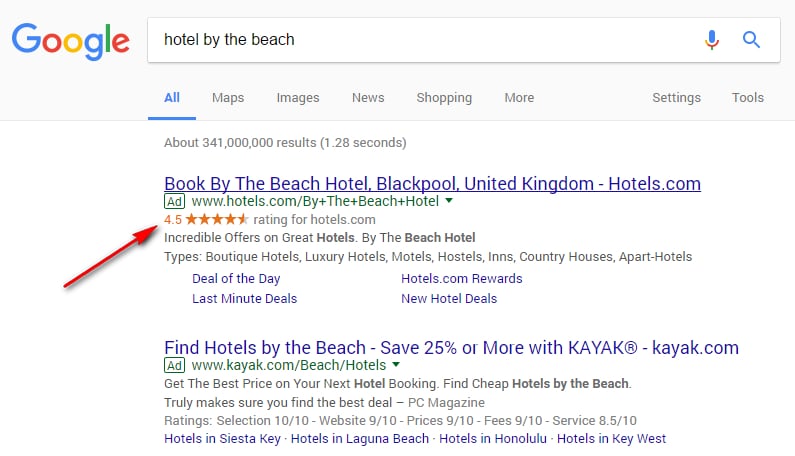
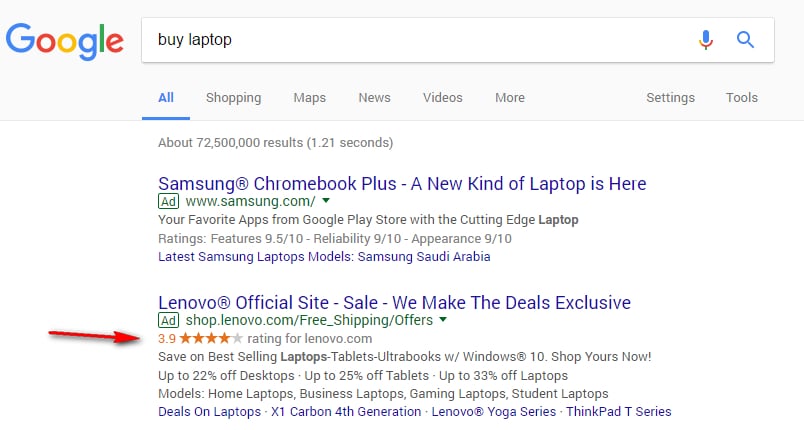
Have you noticed the gold stars next to some Google ads? Or perhaps you’ve heard the term ‘seller ratings’ but have no idea what that means or how to get your business rated? Then we’re here to demystify the whole process for you. Read on to find out exactly what Google seller ratings are and how they can dramatically increase the performance of your online ads. We’ll also tell you how to get great Google seller ratings for your business.

google seller rating

Google seller ratings help online shoppers make informed purchasing decisions. The automated extension collates information from independent review sites to create an overall rating for your business. This is displayed in the form of gold stars beneath your Google ads, which provides an instant, visual snapshot of how customers rate your business on a scale of one to five.  

Google seller ratings appear across all browsers and platforms and are free for businesses; you don’t pay if a customer clicks on your star rating. Let’s take a look at some examples of Google seller ratings from around the internet:

Travel

11

Retail

22


Why do you need Google seller ratings?

Great Google seller ratings can really boost your business, here’s how:

  • Ratings increase the performance of your ads. Google seller ratings increase the click-through rate (CTR) from adverts on average by 17%. 
  • Positive reviews matter to consumers. This report shows that 92% of customers read online reviews and 88% of online shoppers take reviews into account when they’re making purchasing decisions.
  • High Google seller ratings encourage customers to trust your business; 68% of people questioned in the above survey said positive reviews made them trust a business more.
  • Star ratings are proven to be the most influential ratings factor, says the same report. They provide an eye-catching visual component to ads.
  • Seller ratings are useful if you don’t have a strong, well-established brand yet or work in an industry where many of your competitors don’t have reviews.

How exactly does Google create your seller rating?

Google aggregates independent customer reviews from these sources to produce seller ratings:

  • A list of 31 independent review sites such as Trust Pilot, PriceGrabber, ResellerRatings and Shopper Approved.
  • Google Trusted Stores, which is a certification program for online businesses. Customers can rate their shopping experiences through the program.
  • The results of Google shopping research.
  • StellaService, a third-party company that measures the quality of customer care for online businesses.
  • Google consumer surveys, which collect data about businesses and domains.

Google filters out reviews which it considers are suspicious or untrustworthy and may not show reviews for items or services unrelated to your Google ad. You can choose to disable the seller ratings function if you wish.

How do you get Google seller ratings?

To be eligible to receive seller ratings on your Google ads, your business has to meet the following criteria:

  • You must have at least 150 reviews from the last 12 months.
  • You must have an average star rating of 3.5 or higher.
  • In your AdWords account, you need to set your campaign type to: ‘Search Network with Display Select,’ ‘Search Network Only,’ or ‘Search and Display Networks.’
  • Seller ratings will only be displayed when searching from: google.com, google.co.nz, google.co.uk, google.nl, google.com.au, google.de, google.co.jp, google.fr, or google.com.br.
  • At least 10 reviews must be in the same language as the searcher’s Google interface. For example, if a searcher finds you through Google New Zealand then 10 reviews must be in English for seller ratings to show up. If they’re searching from France, 10 reviews must be in French.

In addition, make sure that all shopping and review sites you use list your correct business name and URL to allow Google to accurately aggregate your rating.

Which review websites should you use and how much do they cost?

Which review websites should you use and how much do they cost?

The best way to get Google seller ratings is to join a review site that has the following features:

  • It must be listed as one of the 31 Google licensed partners.  
  • The site should allow you to monitor reviews and respond to negative feedback.
  • You should be able to email previous customers to request a review.
  • The site should verify your reviews by only allowing users to leave a review after they’re actually bought something from you.  
  • The site should allow you to share your reviews on your social media channels.

Rating and review sites usually charge a monthly membership fee and you often have to submit an enquiry to get a tailored quote. Here are some prices and features for the most popular rating sites which Google uses to produce their seller ratings:

trust pilot

Trust Pilot

Trust Pilot verifies reviews by asking for proof of purchase such as receipts and order confirmations. You can easily contact past customers for reviews and use Hootsuite to share your reviews on social media. Trust Pilot allows you to submit one response to each review.

Price: monthly packages start at $599.

shoppers approved

Shopper Approved

Shopper Approved has a ‘pay-as-you-grow’ pricing model with a free trial. You can easily collect and share reviews and it even allows reviewers to submit video testimonials. Shopper Approved alerts you to negative reviews and allows you to respond in private; the customer is later given a chance to update their review.

Price: starts at $99 per month.

reviews co uk

Reviews.co.uk

Reviews.co.uk shows which reviews are verified with invoices or order IDs and which aren’t. The site also allows you to reply to reviews and flag any that are suspicious. You can share reviews on social media and customers are able to attach review photos and ask you direct questions through a Q&A interface.

Price: costs between $29 and $199 per month.

reseller ratings

ResellerRatings

ResellerRatings is the biggest review site but it doesn’t have a transparent pricing system and has a few bad reviews itself. The site shows which reviews have been verified and which haven’t; you can respond to reviews and share them on social media.

Price: costs vary per month according to ResellerRating’s independent algorithm.

Yotpo

Yotpo

Yotpo displays both verified and unverified reviews, which you can respond to and share on social platforms. Customers can attach review photos and you can import existing customer reviews from other outlets.

Price: start from $400 per month.

seller reviews

Tips for gaining more seller reviews

So you’ve signed up to a ratings site, but how can you encourage customers to give you a great write-up? Here are some quick tips for gaining more seller reviews:

  • Ask previous clients to review you.
  • Provide an awesome service so customers feel compelled to leave positive feedback.
  • Request feedback at the right stage of the customer journey; send shoppers an email straight after the transaction has been completed or even add a survey form to the confirmation page. Test the placement of your review requests to see what works best.
  • Make it easy for customers to leave feedback, don’t ask them to log-in or navigate through multiple pages. Instead, make sure all they have to do is simply select a star rating and leave space for any comments they want to add. Ensure that your review request system works on all browsers and across all platforms, especially mobiles.
  • Monitor your reviews and respond to negative feedback. This will allow you to resolve problems and show potential customers that you care about the service you deliver and want to rectify issues.
  • Bear in mind that once you have over 150 reviews, you may have to wait a few weeks for this information to be indexed by Google before your star seller ratings start showing on your ads.

So now we’ve demystified Google seller ratings for you it’s time to go out there and boost your business by collecting your own golden stars.

New Merchant Center Feed Rules Helps You Submit Your Product Data Into Google Shopping Feed Format

Finding the right customers on Google Shopping starts with your Merchant Center product feed: it contains all the information about the products you sell to help online shoppers find just what they’re looking for. But we know that creating and maintaining a complete and compliant data feed can be challenging. To make feed management easier, we’re excited to introduce Feed Rules, a self-service tool to help you transform your existing data from your inventory management systems into the format accepted by Google Shopping. Feed Rules helps you streamline your data feed uploads, whether you’re already running Shopping campaigns or you’re just getting started.

Use Feed Rules to set up and maintain your feed in Google Shopping format 
Feed Rules allows you to perform basic transformations of your existing product data — making it easier than ever to get your data feed up and running. You can export and submit your product data in your own format, and use different rules to transform it into product attributes and values that follow the Google Shopping feed specification, directly in Merchant Center:

  • Map your column headers to the attribute names supported by Google Shopping. For example, if you have an existing feed with the unsupported column header “main title”, you can set up a rule in Merchant Center to have it recognized as the supported attribute name, “title”. 
  • Transform the values in your feed to values supported by Google Shopping. For example, to submit gender specifications for your products, you can transform the unsupported value “for women” in your existing feed to the supported value “female”. 
  • Populate missing attribute values with a fixed value, or with different values based on conditional criteria. For example, if the “condition” attribute is missing and you’re only selling new products, you can set up a rule to have this attribute automatically set to “new”. 

Once you specify new rules for a feed, all future uploads of this feed will be processed according to those rules.

Use Feed Rules to organize your data for campaign optimization You can also use conditional rules to better organize your data:

  • Implement rules for custom labels to structure your campaigns in new ways. For example, you can group products by price ranges or margins, then later bid differently on these groups. 
  • Tag your products with a shipping label. For example, you can derive “heavy” from the category, label those products, and define a particular shipping cost for those items. 

As we introduce the first version of Feed Rules, we’re eager to learn about even more use cases from you. Feedback and suggestions for this feature can be entered directly from your Merchant Center account by clicking the gear icon in the top-right corner of the page and selecting “Send Feedback” to let us know what you think.

Source: Official Google Webmasters Blog