A Fast Start To 2017 For Click-To-Call Ads

Living in a mobile-first world has made it easier than ever to pick up the phone and talk to a business directly. That’s why we’ve continued investing in call innovations based on the great feedback we’ve heard from you. From call-only ads for marketers who prioritize calls to imported call conversions that allow you to upload your own call conversion data directly into AdWords, we’ve strived to drive more high-quality calls to your business in three main ways:

  1. Simplified workflows so you can set up click-to-call ads faster
  2. Better ad experiences that make it easier for people to call you
  3. Detailed call reporting that shows which parts of your campaigns drive the most valuable calls 

We have new updates coming soon across these areas to help you improve your calls performance.

Get your call extensions up and running more quickly

Account-level call extensions will begin rolling out this week to help you set up call extensions at scale. You can implement them once across your entire account rather than adding them multiple times to individual campaigns and ad groups.
In the coming months, we’re also rolling out automated call extensions to more advertisers globally to help you set up call extensions more quickly. AdWords will identify landing pages that already feature a prominent phone number, and automatically set up a call extension and call reporting for this phone number to help you drive more calls to your business

New year, new look for click-to-call ads

In addition to making call extensions quicker to set up, we’re improving the ad experience to help consumers call you more easily. For example, we started testing business names in the headlines of call-only ads last year to help advertisers maximize high-quality calls from people who intend to call them.

“Introducing business names to call-only ads has improved the quality of calls we drive from Google Search for clients across our agency. We’ve been able to showcase their brands more clearly and increase user trust, which has led to significantly higher clickthrough and call conversion rates.”
Kevin Quinlan, President of wommster.com

We’re now rolling this change out globally and will continue experimenting with other new features in click-to-call ads, including testing caller satisfaction ratings to show consumers which businesses are delivering a great user experience over the phone.

New reporting for keyword and ad-level call details

Measuring performance from your click-to-call ads is essential for making informed decisions about your spend and optimizations. AdWords call reporting is easy to set up and available in 23 countries around the world at no additional cost to show you useful insights and conversions from the calls you’re receiving. We’ll soon be adding new call details to your keyword and ad copy reports. Additional columns for “Phone impressions” and “Phone calls” will give you a more complete view of call performance and help you see where there are opportunities to improve. For example, consider using call-only ads on keywords with the highest phone-through rates, or decreasing wait times when you have customers on the phone to improve call conversion rates.
We hope these new updates to click-to-call setup, ad experiences and reporting will help you ring in 2017 with great calls performance. To learn more, visit the Help Center and read our best practices for driving phone calls to your business and optimizing the caller experience.

Source: Official Google Webmasters Blog

Google Manufacturer Center Opens Self-Sign Up, Letting Even More Manufacturers Elevate Their Brands Online

Many brands and manufacturers rely on individual retailers to showcase and sell their products; however, this can make distributing and monitoring manufacturer product information complicated, as those retailers may not always have the most accurate and up-to-date product details. In 2015, we launched Google Manufacturer Center to enable these brands to offer enhanced product images, descriptions, and variants for a more consistent brand experience across Google. Since then, thousands of brands have taken advantage of the tool to best represent their products to shoppers, to access unique analytics and insights — and ultimately — to improve the performance of Shopping ads featuring their products.

Today, we’re excited to announce the launch of self-sign up for Manufacturer Center, which will allow even more brands to manage their product information across Google. Now, brands can set up their accounts in a matter of minutes and start submitting authoritative, detailed, and rich product information (including images, titles, descriptions, videos, and more) to help their products stand out in a crowded marketplace — whether shoppers are looking for inspiration, to compare products, or to make a purchase.

Below, we’re highlighting two recent success stories from leading brands that are investing in rich product content to best showcase their products to shoppers on Google.

Johnson & Johnson drives a premium brand experience with high-quality product images

Johnson & Johnson, manufacturer of popular household brands such as Band-Aid, Neutrogena, and more, has been uploading rich product data to Manufacturer Center over the past year.

“Google Manufacturer Center provides us as brand manufacturers, the ability to influence product experiences, drive purchase decisions, and surface high quality and accurate product information, content, and product imagery,” said Faisal Rangwala, Senior Manager of eCommerce Strategy at Johnson & Johnson.

Johnson & Johnson is driving a premium search experience for products such as their light therapy acne treatment mask, by uploading more accurate and descriptive data.

As a result, when compared to category benchmarks, Johnson & Johnson realized:

  • A 22% increase in impressions, helping even more customers discover their brand through search results
  • A 27% increase in clicks, engaging more potential customers with their retailers’ Shopping ads.

Safavieh gains impressions and qualified clicks by uploading better product data

International home furnishings company Safavieh submitted data to Manufacturer Center to better showcase their collections through Shopping Ads. Prior to their participation in Manufacturer Center, they relied on retail partners to submit product information to Google. As a result, they often found that their products were displayed in Google Shopping search results without the most up-to-date images, product attributes, videos or detailed descriptions.
“Manufacturer Center has provided us with a great way of engaging our customers with more accurate, useful information. We can’t say enough about how being part of Google Manufacturer Center is helping to drive more traffic to our website, our retail partners’ websites, and ultimately greater sales for our products.” said Arash Yaraghi, CEO at Safavieh.

With Manufacturer Center, Safavieh has captured consumer attention by providing more enhanced content, so when a consumer searches for “rugs”, Safavieh can showcase multiple high-resolution zoomable images, YouTube videos, and longer descriptions.

By uploading richer content and videos to improve their Shopping ads, when compared to category benchmarks, Safavieh achieved:

  • A 46% increase in impressions, improving product discoverability on Google
  • A 35% increase in clicks, with users spending more time on retailer’s sites

Getting started with Manufacturer Center

Once brands open their account, they can upload their product data directly to Manufacturer Center or work with a data partner that can streamline their product data submission to Google. A list of our approved Google Shopping data partners can be seen on our partner page. To learn more about Manufacturer Center or to sign up, visit our website.

Source: Official Google Webmasters Blog

Increase Web Site Traffic with SearchEnginePros.com

Increase Web Site Traffic with TheSearchEnginePros.com

A webmaster seeking to increase web site traffic faces many challenges in the age of the search engine — especially when attempting to find web marketing services to match his or her CMS system. Implementation of SEO for CMS based websites can be highly challenging. It is important that we find a reliable SEO Campaign Management Specialist to implement SEO for your websites.

Santa Barbara, CA – Today website development costs have reduced dramatically and launching a website has become just a breeze with all the free tools and open sources systems that are available. One of the latest open source systems that meet most requirements is Joomla. This is one of the most powerful and sophisticated open source systems. Businesses can launch robust websites in a matter of few clicks using the built-in tools available with Joomla. This saves a lot of development time to launch highly professional websites with fraction of the cost, and a webmaster can immediately increase web site traffic by deploying simple yet sophisticated Joomla plug-ins for additional site functionality. Besides the cost and time advantage, there are number of other advantages in using Joomla. However, along with these advantages comes an undeniable and critical disadvantage. There are many complications in terms of implementation of SEO for Joomla based websites.

Since the cost of website development has come down drastically and there is a great need to launch websites to promote one’s business online. Every day thousands of websites are launched. In such circumstances, one can easily get lost in the competition. Therefore, businesses need to promote their websites and increase website traffic, and one of the best ways of gaining visibility online is to implement search engine optimization. As noted already implementing SEO for Joomla-based websites presents special challenges. It requires a great level of experience to optimize Joomla-based websites. Not all web development companies are capable of developing an SEO Friendly CMS; only a company with search engine optimization experience can create SEO-friendly systems. Web development companies will be more concerned about creating functionally robust systems rather than being preoccupied with creating SEO-friendly CMS. Therefore, it is crucial that website owners find an SEO Campaign Management Specialist who can assist with Joomla Search Engine Optimization. Web marketing services capable of handling CMS natural search optimization are surprisingly rare given the popularity of such software.

One of the best places to go for Joomla Search Engine Optimization Tips and for SEO assistance is SearchEnginePros.com. They offer specialized web marketing services that will cater to all your search engine optimization needs and help you increase website traffic. They have the needed expertise to deal with Joomla Search Engine Optimization. They offer all types of web marketing services that will increase online popularity and targeted traffic to websites. There are hundreds of web marketing services online that promise to get website top rankings in Google and in other major search engines. Among these, only a fraction of search engine optimization companies meets their promises. This caused a lot of distrust among the website owners regarding SEO and web marketing services. The nature of web marketing is such that one cannot so easily guarantee results because there are too many variables that decide a website’s ranking and popularity. Only companies such as searchenginepros.com that have mastered the SEO concepts can produce the desired results. For more information on reliable SEO services visit,

searchenginepros.com

Making YouTube Better In A Mobile, Cross-Screen World

Throughout the day, people turn to their nearest device for help making choices about what to do, what to watch, or even what to buy. More than anywhere else, these moments happen on Google and YouTube, and more often than not, they happen on mobile.

With over 50% of YouTube views now on mobile, we’re focused on building scalable solutions that will work across screens. To do this, we’re announcing changes today that allow advertisers and agencies to better measure their campaigns and reach their audience on YouTube across screens, while continuing to offer users control over their ads experience on YouTube.

Next generation insights and reporting

We’re developing a new, cloud-based measurement solution over the next year that will be at the cutting edge both in generating advertiser insights and in protecting privacy and security across Google and YouTube. With this new solution, advertisers will have access to more detailed insights from their YouTube campaigns across devices, so they can better understand the impact of their campaigns on their highest-value customers. For instance, a car manufacturer could get a rich understanding of how YouTube ads across devices influenced a specific audience (like previous SUV buyers).

As we build this new measurement solution, we will continue to work closely with leading MRC accredited vendors including comScore, DoubleVerify, IAS, MOAT, and Nielsen. Together, these vendors account for the vast majority of third-party measurement on YouTube. These collaborations will enable agencies and advertisers to continue to independently measure and verify the performance of their campaigns.

Improved ways to reach your audience

As more viewership on YouTube shifts to mobile, we’re making it easier for advertisers to deliver more relevant, useful ads across screens. Now, information from activity associated with users’ Google accounts (such as demographic information and past searches) may be used to influence the ads those users see on YouTube. So, for example, if you’re a retailer, you could reach potential customers that have been searching for winter coat deals on Google and engage with them with your own winter clothing brand campaign at just the right moment. In addition, we’re creating new ways for advertisers to use their customer data to reach their highest-value customers on YouTube using Customer Match. For example, that same retail advertiser could reach customers that signed up to receive special offers in their stores.

User controls built for the mobile world

In addition to the advertiser solutions announced above, users will continue to have control over what ads they see on YouTube and across Google with the controls in My Account, and as always, we maintain strict policies against sharing personally identifiable information with advertisers. In the coming weeks, we’ll enable a user control that was built with cross-screen viewing in mind: if a user mutes an advertiser on Google Search, ads from that advertiser will also be muted when they watch on YouTube. For example, if you see a gym membership ad but have already signed up for a gym as part of your New Year’s resolution, you can mute that ad in Search, and you won’t see ads from that advertiser on YouTube.

Paving the path for the future

As we roll out these changes, we’re supporting the platforms where the majority of users watch today rather than continuing to invest in the legacy technologies of the desktop web. As a result, we’ll be limiting the use of cookies and pixels on YouTube starting this year.

While technologies like pixels and cookies still have a role in the broader ecosystem, most were built for a single screen—neither pixels nor anonymous cookies were designed for the ways in which users increasingly watch content on YouTube, like on the mobile app or in the living room. This can lead to inconsistent measurement and less relevant ads across screens, making it harder for people to control the ads they see or the data used to show them.

By investing more in the mobile first solutions we’re announcing today, users will have more choice and transparency over how they experience ads on Google and YouTube, and advertisers will have more opportunities to be present and relevant in the moments their audience chooses to watch.

Source: Official Google Webmasters Blog

Google Seller Ratings: Demystified

Google Seller Ratings: Demystified

Have you noticed the gold stars next to some Google ads? Or perhaps you’ve heard the term ‘seller ratings’ but have no idea what that means or how to get your business rated? Then we’re here to demystify the whole process for you. Read on to find out exactly what Google seller ratings are and how they can dramatically increase the performance of your online ads. We’ll also tell you how to get great Google seller ratings for your business.

google seller rating

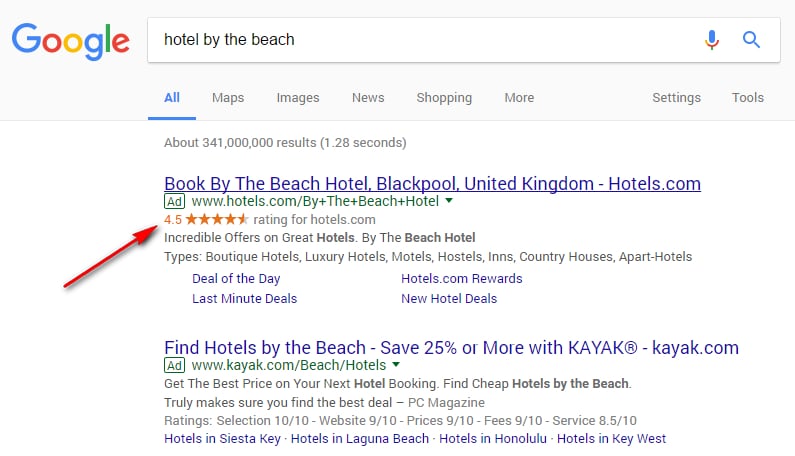
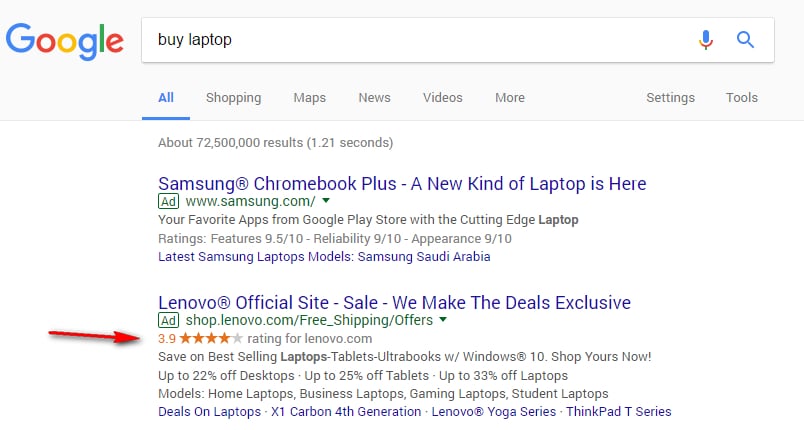
Google seller ratings help online shoppers make informed purchasing decisions. The automated extension collates information from independent review sites to create an overall rating for your business. This is displayed in the form of gold stars beneath your Google ads, which provides an instant, visual snapshot of how customers rate your business on a scale of one to five.  

Google seller ratings appear across all browsers and platforms and are free for businesses; you don’t pay if a customer clicks on your star rating. Let’s take a look at some examples of Google seller ratings from around the internet:

Travel

11

Retail

22


Why do you need Google seller ratings?

Great Google seller ratings can really boost your business, here’s how:

  • Ratings increase the performance of your ads. Google seller ratings increase the click-through rate (CTR) from adverts on average by 17%. 
  • Positive reviews matter to consumers. This report shows that 92% of customers read online reviews and 88% of online shoppers take reviews into account when they’re making purchasing decisions.
  • High Google seller ratings encourage customers to trust your business; 68% of people questioned in the above survey said positive reviews made them trust a business more.
  • Star ratings are proven to be the most influential ratings factor, says the same report. They provide an eye-catching visual component to ads.
  • Seller ratings are useful if you don’t have a strong, well-established brand yet or work in an industry where many of your competitors don’t have reviews.

How exactly does Google create your seller rating?

Google aggregates independent customer reviews from these sources to produce seller ratings:

  • A list of 31 independent review sites such as Trust Pilot, PriceGrabber, ResellerRatings and Shopper Approved.
  • Google Trusted Stores, which is a certification program for online businesses. Customers can rate their shopping experiences through the program.
  • The results of Google shopping research.
  • StellaService, a third-party company that measures the quality of customer care for online businesses.
  • Google consumer surveys, which collect data about businesses and domains.

Google filters out reviews which it considers are suspicious or untrustworthy and may not show reviews for items or services unrelated to your Google ad. You can choose to disable the seller ratings function if you wish.

How do you get Google seller ratings?

To be eligible to receive seller ratings on your Google ads, your business has to meet the following criteria:

  • You must have at least 150 reviews from the last 12 months.
  • You must have an average star rating of 3.5 or higher.
  • In your AdWords account, you need to set your campaign type to: ‘Search Network with Display Select,’ ‘Search Network Only,’ or ‘Search and Display Networks.’
  • Seller ratings will only be displayed when searching from: google.com, google.co.nz, google.co.uk, google.nl, google.com.au, google.de, google.co.jp, google.fr, or google.com.br.
  • At least 10 reviews must be in the same language as the searcher’s Google interface. For example, if a searcher finds you through Google New Zealand then 10 reviews must be in English for seller ratings to show up. If they’re searching from France, 10 reviews must be in French.

In addition, make sure that all shopping and review sites you use list your correct business name and URL to allow Google to accurately aggregate your rating.

Which review websites should you use and how much do they cost?

Which review websites should you use and how much do they cost?

The best way to get Google seller ratings is to join a review site that has the following features:

  • It must be listed as one of the 31 Google licensed partners.  
  • The site should allow you to monitor reviews and respond to negative feedback.
  • You should be able to email previous customers to request a review.
  • The site should verify your reviews by only allowing users to leave a review after they’re actually bought something from you.  
  • The site should allow you to share your reviews on your social media channels.

Rating and review sites usually charge a monthly membership fee and you often have to submit an enquiry to get a tailored quote. Here are some prices and features for the most popular rating sites which Google uses to produce their seller ratings:

trust pilot

Trust Pilot

Trust Pilot verifies reviews by asking for proof of purchase such as receipts and order confirmations. You can easily contact past customers for reviews and use Hootsuite to share your reviews on social media. Trust Pilot allows you to submit one response to each review.

Price: monthly packages start at $599.

shoppers approved

Shopper Approved

Shopper Approved has a ‘pay-as-you-grow’ pricing model with a free trial. You can easily collect and share reviews and it even allows reviewers to submit video testimonials. Shopper Approved alerts you to negative reviews and allows you to respond in private; the customer is later given a chance to update their review.

Price: starts at $99 per month.

reviews co uk

Reviews.co.uk

Reviews.co.uk shows which reviews are verified with invoices or order IDs and which aren’t. The site also allows you to reply to reviews and flag any that are suspicious. You can share reviews on social media and customers are able to attach review photos and ask you direct questions through a Q&A interface.

Price: costs between $29 and $199 per month.

reseller ratings

ResellerRatings

ResellerRatings is the biggest review site but it doesn’t have a transparent pricing system and has a few bad reviews itself. The site shows which reviews have been verified and which haven’t; you can respond to reviews and share them on social media.

Price: costs vary per month according to ResellerRating’s independent algorithm.

Yotpo

Yotpo

Yotpo displays both verified and unverified reviews, which you can respond to and share on social platforms. Customers can attach review photos and you can import existing customer reviews from other outlets.

Price: start from $400 per month.

seller reviews

Tips for gaining more seller reviews

So you’ve signed up to a ratings site, but how can you encourage customers to give you a great write-up? Here are some quick tips for gaining more seller reviews:

  • Ask previous clients to review you.
  • Provide an awesome service so customers feel compelled to leave positive feedback.
  • Request feedback at the right stage of the customer journey; send shoppers an email straight after the transaction has been completed or even add a survey form to the confirmation page. Test the placement of your review requests to see what works best.
  • Make it easy for customers to leave feedback, don’t ask them to log-in or navigate through multiple pages. Instead, make sure all they have to do is simply select a star rating and leave space for any comments they want to add. Ensure that your review request system works on all browsers and across all platforms, especially mobiles.
  • Monitor your reviews and respond to negative feedback. This will allow you to resolve problems and show potential customers that you care about the service you deliver and want to rectify issues.
  • Bear in mind that once you have over 150 reviews, you may have to wait a few weeks for this information to be indexed by Google before your star seller ratings start showing on your ads.

So now we’ve demystified Google seller ratings for you it’s time to go out there and boost your business by collecting your own golden stars.

Reminder: Transition To Expanded Text Ads Before January 31, 2017

This is a friendly reminder that starting on January 31, you’ll only be able to create and edit text ads using the expanded text ads format. You’ll no longer be able to create standard text ads. While this will be the last date to create them, existing standard text ads will continue to serve. Expanded text ads can deliver great results, particularly with a commitment to testing new creatives.

As one of the top places people go online to search for apartments, Apartments.com knows the importance of having a strong digital presence. Wanting to provide renters with even more information about its listings, Apartments.com added expanded text ads to its Search campaigns. Apartments.com’s results were strong across its campaigns. It saw 15% and 10% increases in CTRs for expanded text ads on mobile and desktop, respectively.
While making similar improvements to your ads, keep these best practices in mind:

  • Implement multiple versions of your ads. Aim for at least 3-5 per ad group.
  • Leave your standard text ads running.  You can’t create new ones, but the old ones can still serve. Don’t delete them until they stop receiving impressions on their own or the message is no longer accurate.
  • Plan to optimize your ad rotation for clicks or conversions. These options give preference to ads that are likely to perform better.
  • Focus your testing on headlines. They’re the most important part of your ads.
  • Consider shorter headlines on things like brand terms where someone might not need more info.
  • Iterate new ads based on previously successful creative. Learn from what already works.
  • Add terms from user queries and your keywords in your longer headlines whenever appropriate.

Along with those best practices, remember that after January 31 you can pause and resume standard text ads, but it’s best to create new expanded text ads.
As you prepare for expanded text ads to become the only way to create new text ads, check out our best practices guide for creating effective ads or our previously-hosted Hangout-on-Air for more advice. Take advantage of AdWords Editor, the AdWords API, or the ETA Transition Helper to make these changes across your entire account.

Source: Official Google Webmasters Blog
Top 10 WordPress Themes for Restaurants

Top 10 WordPress Themes for Restaurants

It’s not enough to just serve great food these days, every restaurant needs an engaging website to be noticed. Customers like to check out menus, read reviews and have the option of booking a table online before they visit. Luckily, you don’t need to be a design pro to create beautiful, user-friendly restaurant web designs, as there are plenty of great WordPress themes that will do the job for you. We’ve put together a list of the top 10 options.

Top 10 WordPress Themes for Restaurants

  • Sage
WordPress Themes for Restaurants

Not sure how you want your website to look? Then Sage is a great option for you as there are over 40 demo sites to choose from covering everything from Seafood, Vegan and Thai to Bakery, Brewery or Tea House designs. Once you’ve selected a demo you can use the theme options panel to easily customize the design to suit your restaurant.

Top Sage Features

  • Four free ad-ons
  • Ability to set up an online shop with WooCommerce
  • Drag-and-drop menu builder
  • Six-month customer support and one-click install

Price – $59

More info/download Sage

  • Food Truck
WordPress Themes for Restaurants

This is the ideal theme for street vendors, food truck owners or small food businesses. Food Truck incorporates simple page and menu builders and is easy to tweak, including nearly 90 custom shortcodes, 10 widgets and over 600 Google Fonts. However, this theme’s key selling point is its truck locator map, which allows customers to find you easily.

Top Food Truck Features

  • Truck locator map
  • Events listings
  • E-commerce capabilities
  • Six-month customer support and one-click install

Price – $59

More info/download Food Truck

  • Resca
WordPress Themes for Restaurants

Resca is one of the top restaurant website themes and looks great on all devices. Choose from one of the demo sites and make it your own by selecting from hundreds of colors, skins, fonts and icon options. Resca’s star attraction is its events calendar which will keep your customers in the know.

Top Resca Features

  • Events calendar and countdown clock
  • OpenTable reservation and booking
  • Ability to set up an online shop with WooCommerce
  • Six-month customer support and one-click install

Price – $59

More info/download Resca

  • Tavern
WordPress Themes for Restaurants

Tavern is one of the most popular WordPress themes for pubs and restaurants. It includes well-known plug-ins like Revolution Slider, Essential Grid and Visual Composer, all of which allow you to create any site layout. You can drag and drop pre-built features to customize your design and improve the user experience with a reservation/booking system and online shop.

Top Tavern Features

  • Translation feature
  • OpenTable reservation and booking
  • Ability to set up an online shop with WooCommerce
  • Six-month customer support

Price- $59

More info/download Tavern

  • Luigi
WordPress Themes for Restaurants

If you’re in the fine dining sector or run a high-end eatery such as an Italian Bistro, then Luigi is the classy restaurant theme for you. The theme boasts a Hero Block feature which allows for full-width images and customizable titles, text and fancy call-to-actions. Luigi also has an online table reservation system, event organizer and GoodReviews plug-in so customers can let everyone know how great your food is.

Top Luigi Features

  • GoodReviews plug-in to display customer reviews and ratings
  • Event organizer
  • Reservation booking system
  • Classy, image-heavy design

Price – $79

More info/download Luigi

  • LaCuisine
WordPress Themes for Restaurants

LaCuisine is a clean, ultra-responsive theme suitable for any type of eatery. Start with one of their stylish demo sites and edit to suit your style with the hundreds of fonts, colors and layout options. LaCuisine’s key features include sharp, retina-ready graphics and an engaging menu builder which allows diners to click on dishes and leave a review or pre-order them.

Top LaCuisine Features

  • Engaging menu builder which enables diners to leave reviews
  • Restaurant Reservations plug-in
  • Ability to set up an online shop with WooCommerce
  • Six-month customer support

Price – $59

More info/download LaCuisine

  • Nuvo
WordPress Themes for Restaurants

This is an extremely visual theme that offers unlimited color, layout and sidebar options. Nuvo will help you create a site full of Parallex full-screen images and video backgrounds; you can also choose from a huge range of animations and typography. Nuvo is easy to personalize and works well for restaurants, cafes and bistros, however, the theme does looks better on larger devices.

Top Nuvo Features

  • Stunning, image-heavy design
  • Event management section
  • Restaurant booking capability
  • Six-month customer support

Price – $53

More info/download Nuvo

  • Dalton
WordPress Themes for Restaurants

Dalton is a multi-purpose, corporate theme that works well for restaurants as well as other types of businesses. It has six unique homepage designs to start with and over 55 customizable page builder elements, as well as stunning Parallex and retina-ready visuals. This theme uses the Slider Revolution plug-in for smooth scrolling, perfect for websites with lots of images.

Top Dalton Features

  • Image-friendly
  • Integrated with WooCommerce to create online shops
  • Highly customizable with extensive theme options
  • Six-month customer support and one-click install

Price – $59

More info/download Dalton

  • Piquant
WordPress Themes for Restaurants

Piquant offers a simple, bold design and six homepage styles. There are customizable menus, clever call-to-action buttons and awesome image galleries. The stand-out feature of Piquant is its blog function which has six different post templates, so if you’re serious about engaging with your customers and updating them on new dishes and events, this is a great theme to choose.

Top Piquant Features

  • Blog function with post templates
  • Reservation and booking system
  • Compatible with WooCommerce to sell products online
  • Six-month customer support

Price – $59

More info/download Piquant

  • Rosa
WordPress Themes for Restaurants

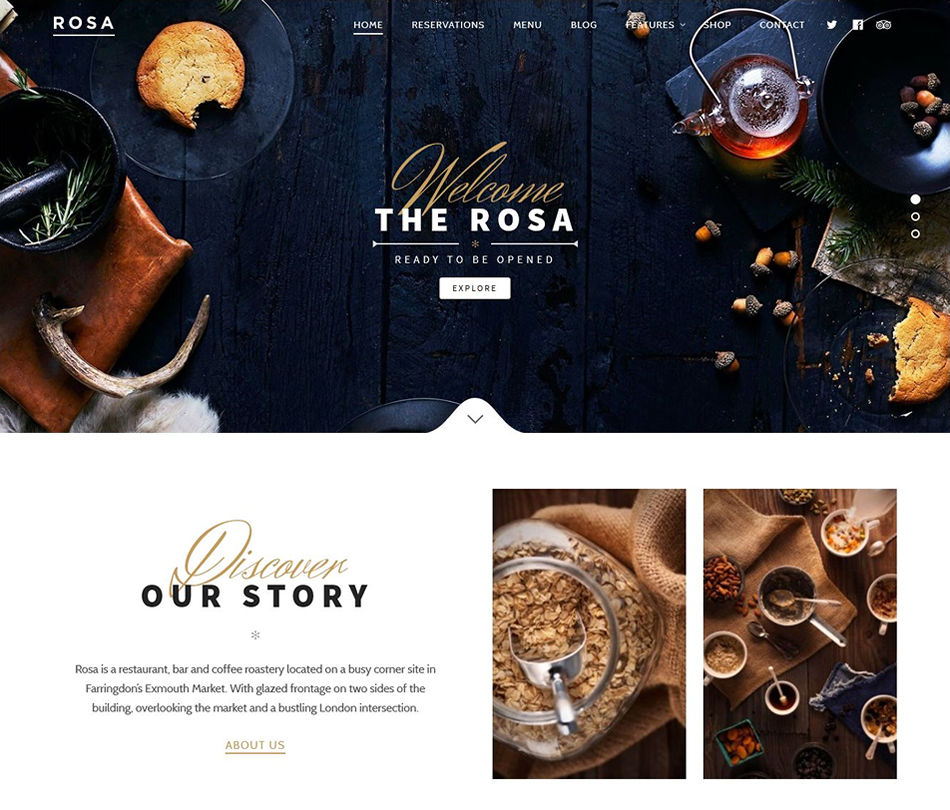
Rosa is great for restaurants, cafes and bakeries and is a popular bar website theme. If you want to focus on high-end images Rosa is a great choice as you can create stunning galleries, Parallex visual effects and video.  The theme also has handy booking and e-commerce capabilities.

Top Rosa Features

  • Ideal for image-heavy sites
  • Reservation and booking system
  • E-commerce capability
  • Six-month customer support

Price – $59

More info/download Rosa

Investing in a top restaurant theme for your website is one of the smartest moves you can make. Rather than battling with web coding, save time and hassle by choosing a ready-made theme and simply modify it to reflect your restaurant’s unique personality. Don’t forget to make use of your theme’s special features to improve user experience, including table booking, e-store, and online review plug-ins. Build a stunning menu and pack your site full of enticing food images and your restaurant will be buzzing in no time!

Video Campaign Management Gets Easier With AdWords Scripts

If you were wishing for an easier way to manage your video ad campaigns in AdWords this holiday season, the AdWords product team has the perfect gift picked out. Today we’re announcing AdWords scripts support for TrueView and six-second bumper ads.

This means for the first time ever, you’ll be able to programmatically create and manage video ad groups, targeting and other campaign features alongside your Search, Display and Shopping campaigns. The new script support is available for standard YouTube ad campaign types like TrueView in-stream, TrueView discovery and bumper ads – and we’re hoping to eventually expand functionality to additional campaign types like shopping.

Making this tool available for video means multi-step campaign management tasks will be much easier – like scheduling regular reporting, creating new campaigns en masse and even automating adjustments to campaigns based on real-time factors, like the weather.

Source: Official Google Webmasters Blog
Save Time By Applying Audience Lists At The Campaign Level

Reaching your most valuable and engaged customers at the moment they’re ready to act is critical in moving them along the path to purchase. Remarketing lists for search ads (RLSA) and Customer Match can help you do that by customizing your campaigns for people who’ve previously interacted with your business. However, getting started can be time-consuming, especially if you have a lot of ad groups. To make it easier for you to manage your audience lists at scale, you can now apply them at the campaign level. 

Campaign-level audience lists also make it easy to measure and change your bid adjustments. Instead of trying to change your bid adjustments for each individual ad group, you can confidently optimize at the campaign level where you’re more likely to have enough data to make an informed decision. Learn more audience bid adjustment best practices here.

Many advertisers are already using campaign-level search audiences to save time and make better optimizations:

“Campaign-level audiences have proven to be a great way to apply our remarketing lists at scale. Our campaigns often contain so many ad groups – using RLSA in the past required hours spent applying audiences to each one and analyzing the results by ad group. By applying them at the campaign level, we can be confident that no ad group is overlooked, while saving us time that can be better spent on helping our customers find their new home.” 

– Debra Carroll, Senior SEM Manager at Redfin 

“Being able to apply all of our audiences at the campaign level has drastically simplified the process of adding lists to multiple campaigns, as most of our campaigns have hundreds of ad groups. This allowed us to apply our bid adjustments in bulk, which has resulted in smarter spending and increased ROAS from our search campaigns.”
– Nathan Eagan, PPC Specialist at Webstaurant

With campaign-level search audiences, you now have more flexibility than ever in how to engage with your customers. Learn more about using campaign-level audiences in the Help Center, and read our best practices guide to learn how you can reach the right audience with a message that resonates. 

Source: Official Google Webmasters Blog

Shoppers Gobble Up In-Store Black Friday Deals On Mobile

As another Black Friday weekend wraps, we saw super shoppers continue to turn to their devices for ideas and information as well as use them as a “door-to-the-store.” In fact, Black Friday had the highest mobile shopping searches of any day during Thanksgiving week this year. Thanksgiving Day was a close second, with searches peaking at 8:00 p.m.1

Further, shoppers across the U.S. turned to mobile to not only find the best deals online but also to discover the best deals in-store: Rhode Island and Delaware had the most local shopping search interest  — searches that contained “near me,” hours and stores — of any states in the nation.2

This strong link between the online and physical world lives beyond the holidays too, and store visits reporting in AdWords is helping advertisers understand it year round. In fact, in just under two yearsadvertisers globally have measured over 3 billion store visits. 
What else did we see in stores over the holiday weekend? Store foot traffic jumped 65% on Black Friday, compared to an average weekend day in November, showing that consumers still care about going into stores for holiday shopping. Clothing, toy, and electronic stores were all popular destinations. Clothing stores and toy stores saw more than double the foot traffic on Black Friday compared to an average weekend day in November.3

Electronics stores were particularly popular, with more than double the foot traffic on Thanksgiving Day and more than triple the foot traffic on Black Friday, compared to an average weekend day in November.4 That makes sense given electronics, including the Nintendo Entertainment System and Sony PS4 Pro, are topping shoppers’ gift lists this year.5

Popular Times feature in Google Maps: Live store foot traffic on Black Friday in Best Buy as indicated by pink bar 

Shoppers also spent more time in stores. For example, in electronics stores, they typically spent between 35 minutes and 1.5 hours on Black Friday compared to 25 minutes on an average day in November. Shopping malls showed a similar increase in visit duration compared to the average day in November.6

To get deeper insight into store visits performance, visit the AdWords Help Center and learn about two new distance and location reports coming soon that will help you understand where your store visits come from.

Source: Official Google Webmasters Blog

1 11 12 13 14 15 16 17 31