New Ways To Put Your Customers First And Achieve Your Marketing Objectives

Life looks very different now for my family than it did earlier this year. From juggling work priorities to managing distance learning for my kids, there never seems to be enough hours in the day. As we adapt, we’re relying on our phones to get things done.

How can brands lend a hand? We believe there are three key ways to put consumers at the core of your strategy: help people quickly get what they want, deliver relevant information and make it easy for your customers to take action.

Today, we’re sharing new ways to put your customers first and achieve your marketing objectives.

Help people get what they want, faster

The stakes are high on mobile. If you don’t give people what they want quickly, they’ll take their business elsewhere. In fact, we recently found that for retail sites, improving your site load time by 0.1s can help you improve conversion rates by 8 percent.

Test My Site has been an important tool for helping diagnose site speed and providing custom tips on how to make it faster. Today, we updated the tool to provide specific recommendations on how you can improve your mobile site—beyond speed—and deliver more personalized and seamless experiences. Key updates include:

  • Aligning speed metrics with Web Vitals, an initiative by Google to provide unified guidance for quality signals that, we believe, are essential to delivering a great user experience on the web. When marketers and developers share the same definition of success, it’s easier to agree on what’s driving results.
  • Customized tips on how to make your site experience relevant and easy to use. For example, learn how to build a one-step checkout and keep customers coming back with relevant push notifications. 

To get started, visit Test My Site to see how your site is doing and download your customized report—with sections for both marketers and developers—that you can share with your team.

Deliver more engaging and helpful ad experiences 

Many marketers already use feeds in Display, Shopping and Local campaigns to quickly upload and showcase products in your ads. With more product images directly in your ad, consumers are able to easily and seamlessly find what they’re shopping for. In the coming months, we’ll roll out feeds in App campaigns globally to all customers. According to beta testing, advertisers using feeds saw, on average, 6 percent more installs from Google.com and 17 percent more in-app actions (like log-ins and purchases) on sites and apps in our network.

Wish, an e-commerce company, used feeds to display diverse products from its marketplace. Wish also enabled deferred deep linking, which gave new app users a smoother onboarding experience—from app install straight to the item they saw in the ad.

Here’s how it works: if a new user taps on a Wish ad for running shoes, she will be directed to her app store to install the Wish app. After installing and opening the app for the first time, she would automatically land on the running shoes’ product page to learn more or make a purchase.

Since adopting feeds and deferred deep linking, Wish has seen a 105 percent increase in purchases from its app at a similar CPA. “These features have made our app more discoverable and appealing to customers,” says Krishanth Kathiresan, Wish’s Head of Growth Marketing. “It’s a scalable way for us to drive more lower-funnel user engagement and, most importantly, mobile orders.”

To get started, you can reach out to your account manager to join our beta or learn more.

Make it easier for your customers to take action

Loyal customers stick with brands that make it easy for them to get things done. For customers who already have your app installed, deep linking lets them get to the relevant page in the app without having to log in or re-enter information. 

Last year at Google Marketing Live, we announced app deep linking from Search, Display and Shopping ads. In the coming months, we’ll be rolling out deep linking from YouTube, Hotel, Gmail and Discovery ads. On average, deep linked ad experiences drive 2X the conversion rates.

Let’s say, your customer is watching a cooking video on YouTube and sees a discount for “2-hour grocery delivery.” Once she taps on the ad, she’s taken directly to a page in the store’s app to place an order.  

Rakuten Ichiba, a Japanese e-commerce company, found that enabling deep linking helped its loyal customers take action on ads directly in the brand’s app, resulting in 4X mobile purchases and 3X conversions. 

App deep linking introduces an important and seamless path to conversion. To give you better insight into where consumers are landing and converting from your ads, you can start to use ad destination reporting in Google Ads—available globally starting today.

For example, let’s say you’re a retailer with both a website and app. With the ad destination report, you can see in the “App deep link” row that these ads drive a higher conversion rate at a lower cost per conversion.

Source: Official Google Webmasters Blog

Drive Results With New Direct Response Solutions On YouTube

Prolonged store closures have forced brands around the world to recalibrate their media campaigns to focus on driving online sales. With this shift to digital, it’s become even clearer that every advertiser is a performance advertiser. 

With YouTube, marketers have the flexibility to shift budgets and invest in driving the results that matter most. As businesses begin to reopen, they have an opportunity to use video to drive both online and offline actions on YouTube, where 70 percent of people say they bought a brand as a result of seeing it on our platform.1 That’s why we’ve invested heavily to introduce effective video solutions that drive action. Last year, the number of active advertisers using TrueView for action grew over 260 percent.2 

Today, we’re making it even easier for you to inspire people to take action on YouTube with smarter solutions that make video more shoppable, use automation to drive conversions, and help you better understand attribution.

Make your video ads your new storefront

Brands are strategically using video ads when merchandising new products. Recently, Aerie needed to simultaneously drive brand love and omnichannel apparel sales for their 2020 spring campaign. They used YouTube as a full funnel solution and connected with audiences with the highest likelihood to purchase. As a result, Aerie saw strong engagement for their brand and achieved a 25 percent higher return on ad spend than the previous year—with nine times more conversions compared to their traditional media mix. 

To help businesses establish a stronger e-commerce presence, we’re experimenting with a new way to make your actionable video ads more shoppable—complementing your ad with browsable product imagery to inspire the next purchase. All you need to do is sync your Google Merchant Center feed to your video ads, and you can visually expand your call-to-action button with the best-sellers you want to feature and drive traffic to the product pages that matter. 

An easier way to drive more conversions

In addition, we know that with limited marketing budgets, it’s become harder to drive reach and convert demand at the same time. Today we’re announcing Video action campaigns, a simple and cost-effective way to drive more conversions across YouTube. It automatically brings video ads that drive action to the YouTube home feed, watch pages, and Google video partners, all within one campaign. To make it even simpler, we’ll include any future inventory that becomes available, like the What to Watch Next feed. This way you can save time to focus on strategic initiatives like crafting the right creative and messaging for your audiences.

We’ve seen Video action campaigns work for companies of all sizes, including Mos, a startup that helps students find funds for college to avoid large student debts. As a newer company, Mos was excited to test out a solution that could drive results quickly. In the last few months, Mos saw 30 percent more purchases for their service at a third of the cost compared to their previous YouTube benchmarks. 

Transform your campaign into a lead generation tool

For businesses that rely on new leads to sustain growth, we recommend adding lead forms to your Video campaigns. Lead forms help advertisers capture qualified leads while reducing costs – all without interrupting the viewing experience. Automobile giant Jeep tried this approach with their Korea branch and saw a 13 times increase in completed leads at an 84 percent lower cost per lead. With lead forms, they generated “the most leads at the most efficient cost among all ad platforms,” says Kenny Hwang, Jeep’s Korea Marketing Manager.

Plan for greater impact across different consumer touchpoints 

We often see that people switch between Search and YouTube to find new information that influences what to buy. In order to help you understand where your conversions are coming from and provide more transparency around your customer’s path to purchase, we’ve included YouTube in our Google Ads attribution reports. Attribution reports can provide insight into how budgets can be allocated to maximize impact across YouTube, search and shopping campaigns.

As businesses begin to reopen and enter into a state of recovery, we hope these new solutions will make it even easier for you to find new leads, boost web traffic or drive sales. To get started on any of these new products and features, please reach out to your Google account team and we’ll be ready to help.

Source: Official Google Webmasters Blog
Make The Best Of YouTube Yours With YouTube Select

Helping you connect with your audience is our top priority. This is especially important as digital takes precedence in how we interact, communicate and stay connected.

To make this even easier for your brand, today we’re announcing a new global content solution called YouTube Select—a reimagination and unification of solutions like Google Preferred and prime packs. It offers more flexibility to reach the audiences you can’t find elsewhere in the content and places they choose to watch—with the confidence that your buy is brand-safe.  

More content for greater relevance at scale

Viewers say YouTube offers the most extensive video library.1 To help you find the right content for your brand, YouTube Select surfaces a diverse mix of content packages called lineups—each tailored to globally and locally relevant needs like beauty & fashion, entertainment, technology, sports and everything in between.

This year, we’re introducing a new offering called emerging lineups in the U.S. Emerging lineups provide an easy way to efficiently extend the reach of your campaigns among up and coming or niche channels, with the added benefit of brand suitability controls. 

Beyond our lineups offerings, YouTube Select can now help advertisers reach new audiences across top YouTube apps and verticals like YouTube Kids, Sports, Music and Originals with sponsorships and programs. Across markets, advertisers should work with their local teams to customize the right YouTube Select plan for their needs.

More capabilities for the TV screen, and how you buy

Around the world, people are turning more and more to YouTube on the biggest screen in their home. This shift in viewing behavior means lineups contain more TV screen inventory than ever before.

For example in the U.S., over 100 million people watch YouTube and YouTube TV on their TV screen each month.2  And according to Comscore, YouTube has a higher household reach and share of watch time than the next 3 ad-supported streaming services combined.3  

That’s why we’re introducing a dedicated streaming TV lineup as part of YouTube Select in the U.S. to help brands reach their audiences where they are watching. Streaming TV combines the best of YouTube TV and lineups content, both on TV screens. That means being able to easily reach your audience with a single, scalable offering on the big screen across the best content, including popular creators, YouTube Originals, live sports, feature length movies, timely news and more.

We also recently announced Brand Lift measurement on TV screens, which will be available globally for the YouTube app and coming soon for YouTube TV, to better help brands measure their results.

In addition to more capabilities on the TV screen, we are also bringing more choice to how you buy. Many countries, including most across Europe and Asia-Pacific, are making certain YouTube Select lineups available via Google Ads, Display & Video 360 and reservation. Connect with your Google sales team to learn more about the buying methods available in your region.

More certainty in your campaigns

With YouTube Select, you can be confident that your ad buys are brand-safe. You’ll have access to advanced brand suitability controls, as well as the option to only serve ads on videos that have been machine classified and human-verified across all lineups (lineup/market dependent).

Harriet Perry, General Manager at OMG Digital says “For Omnicom Media Group UK, the ability to build relevant and customized content plans to support the unique needs of each of our clients is critical. The YouTube Select product will allow us to achieve this, and will also provide us added controls like human verification and brand measurement. Additionally, we are excited about YouTube Select’s audience and scale on OTT/connected TV devices, which will be a core part of our overall connected TV strategy.”

With more content, capabilities and certainty, YouTube Select offers an easier way for you to authentically connect with your audience at scale. Most importantly, YouTube Select helps drive real results for your business. In 2019, global lineups delivered an average awareness lift of 13 percent and an average purchase intent lift of 9 percent.4 And in an MMM meta-analysis we commissioned with Nielsen in the U.S., YouTube Select lineups had greater ROI than TV in 73 percent of MMMs that measured YouTube Select lineups, Other Digital, and TV in 2016-2018.5

Make the best of YouTube yours with YouTube Select. 

Explore YouTube Select programming on our website. Connect with your Google sales team to learn more about YouTube Select offerings and rollout timing in your region.

Source: Official Google Webmasters Blog
Promote Curbside Pickup In Your Local Inventory Ads

In today’s rapidly changing environment, people are looking for real-time updates when it comes to store information and product availability. Searches for “in-stock” grew more than 70 percent globally from the week of March 28 to April 4, as consumers sought to avoid ecommerce shipping delays. We’re here to help you connect local shoppers with the products they need quickly, and promote your safer fulfillment options, like in-store and curbside pickup.

Using local inventory ads, retailers can show users that the products they are searching for are available for nearby store pickup. Now, you can indicate if you offer curbside pickup, right in your local inventory ads. This feature is available in the countries where local inventory ads have launched: Australia, Austria, Brazil, Canada, Denmark, France, Germany, Japan, Netherlands, Norway, Sweden, Switzerland, the UK and the U.S.

Petco is using the curbside pickup badge to highlight contactless pickup availability on essential products like pet food and supplies that are available nearby for same-day or next-day pickup. “As a trusted partner in caring for the overall health and wellness of pets, we’re committed to ensuring pet parents have the essential products they need during this time,” said Jay Altschuler, Petco Vice President of Media Transformation. “To make shopping easier and safer for both pet parents and our own employees, we’ve proudly made a number of changes including launching curbside pickup at most Petco stores nationwide.”

The local inventory ads curbside pickup badge is currently in beta and available to advertisers who have completed the onboarding for store pickup. Reach out to your account team if you’re interested in including curbside pickup in your ads, or complete this form.

If you aren’t running local inventory ads, you can still let customers know whether your store offers pickup, delivery, or curbside pickup. Using Google My Business, you can add or edit attributes to your Business Profile that appear on Search and Maps. This is available globally.

Source: Official Google Webmasters Blog
Google Ads For Local Business: 7 Tips & 3 Mistakes

Google Ads For Local Businesses

Did you know that 76% of people who conduct a local search on their smartphone visit a business within 24 hours, and 28% of those searches result in a purchase? As a local business, it’s a top priority for your ads to be seen and used. But to do that, they have to reach their target audience. They also have to be so appealing that they lead that audience straight to a purchase. So how can your business use Google Ads to benefit your customer and sales growth? Here are 7 of the best practices and 3 mistakes to avoid for local businesses using Google Ads.

Local Google Ads Tip - Increase Your Local Reach Radius

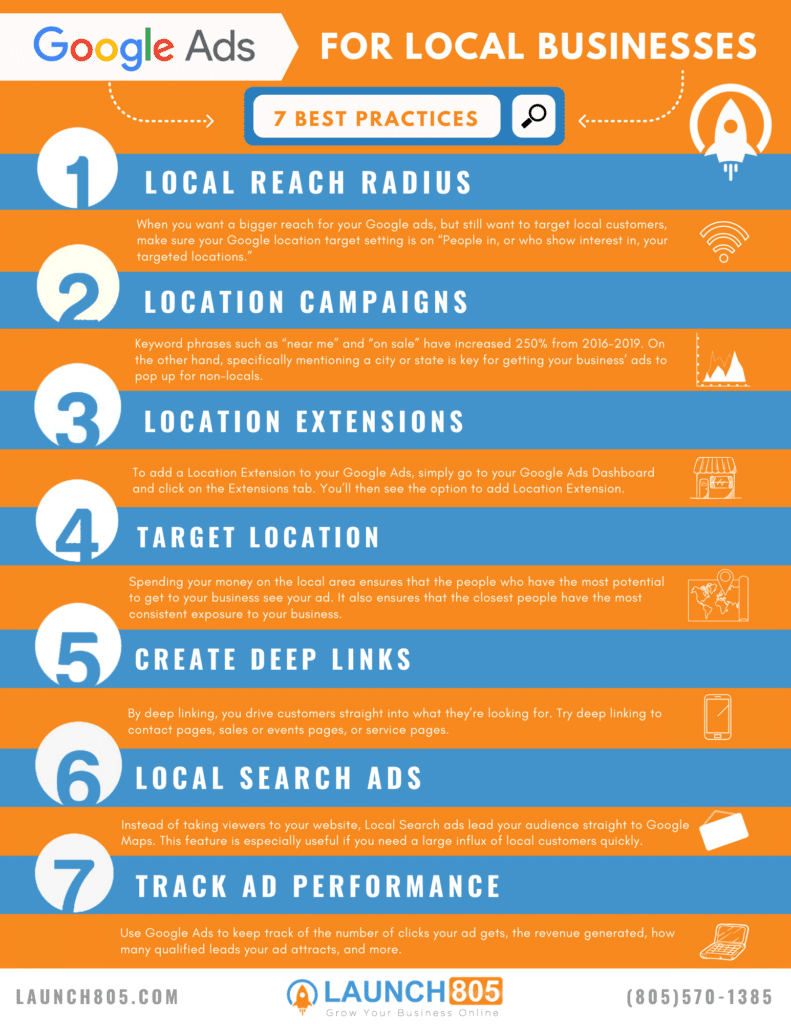
1) Increase Your Local Reach Radius

When you’re trying to get a bigger reach for your Google ads, but still want to reach your local customers, make sure your Google location target setting is on “People in, or who show interest in, your targeted locations.” This setting is recommended by Google and will help your business reach an audience that might not be permanently residing in your location. It also can help your ads reach nearby cities. 

While Google Ads can help increase online sales, increasing your local reach radius also can increase off-line sales. Start “Geo-fencing” or learning how far your customers are traveling to visit your physical business. This way, you know how far to set your Google Ads map radius. Consider setting up surveys in your newsletters or receipt emails that ask the area code of your customers. You can also create a system of asking for area codes with physical purchases.

Google Ads For Local Businesses Article Graphics

2) Take Advantage of All Google’s Location Campaigns Types

While making a campaign is simple, there are several ways you can use campaigns to reach different audiences. For example, if you have a candy shop, you might make a campaign that looks like “candy shop near me.” This campaign will attract anyone within a your set radius.

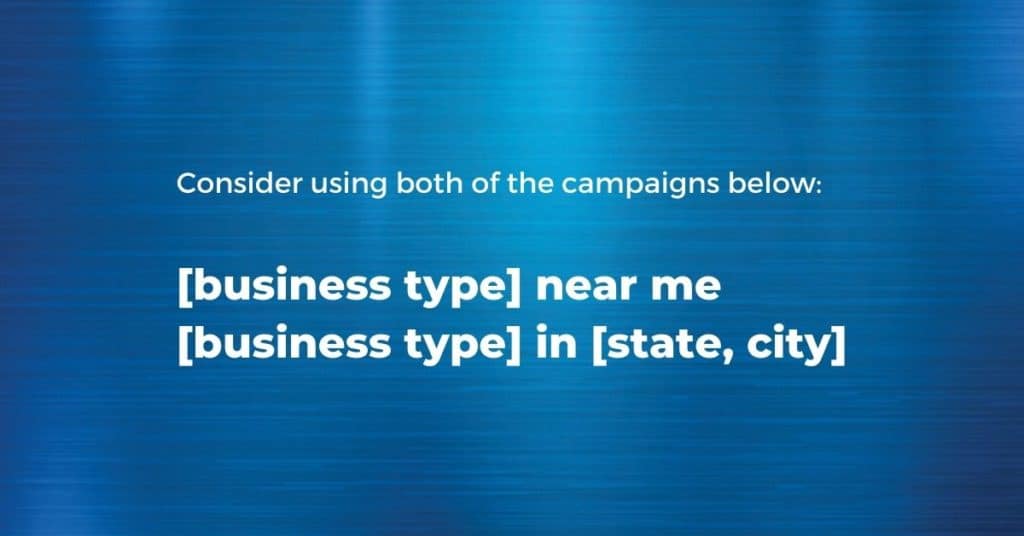
Consider using both of the campaigns below:

[business type] near me

[business type] in [state, city]

Keyword phrases such as “near me” and “on sale” have increased 250% from 2016-2019. On the other hand, specifically mentioning a city or state is key for getting your business’ ads to pop up for non-locals. This group of people may be tourists, travelers, other businesses, and general visitors. Using both of these types of campaigns can greatly impact the response you get from your ad.

Tip: When preparing a Google Ad campaign, be sure to take advantage of Google’s geo-targeted ads, which allows you to pinpoint a target audience that’s as large or small as you want.

3 1

3) Include Location Extensions 

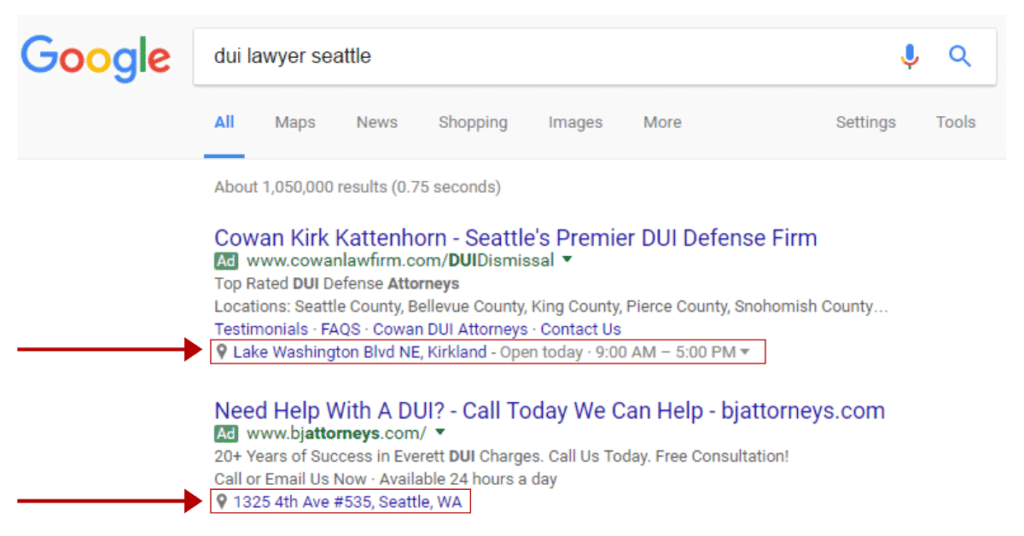
If you’re targeting a local audience, be sure that your ad can take viewers to a map of your business. After all, your ad may reach thousands of people, but if people don’t go to your store or website, the ad is pointless. By including a Location Extension, you allow the ad to connect viewers straight to Google Maps. This practice is especially useful for the many people who are using their cell phones to search for local businesses, as it will help them navigate easily to you.

To add a Location Extension to your Google Ads, simply go to your Google Ads Dashboard and click on the Extensions tab. You’ll then see the option to add Location Extension.

You can also add an Affiliate Location Extension (located directly below Location Extension in the same place). Affiliate Location Extensions showcase affiliates that carry your products. If your products are located in businesses such as Amazon and Target, be sure to add that information here.

Utilizing the Affiliate Location Extension greatly benefits businesses that don’t have their own storefront. By channeling purchases through affiliates, you can increase your audience and sales.

4 1

4) Optimize Bids For Target Location

You’ll want to ensure the bulk of your bid is focused on the areas closest to your business. There are already several aspects of your ad that is set-up to reach a larger radius. Spending your money on the local area ensures that the people who have the most potential to get to your business see your ad. It also ensures that the closest people have the most consistent exposure to your business.

To customize your bid, go to the Location Extension to your Google Ads, on your Google Ads Dashboard. From there you can click your target audience and increase the percent your keywords are optimized for viewers. Select multiple ranges of targets (5 miles, 10 miles, 15 miles), and steadily decrease your bid for each level.

Google Ads For Local Businesses

5) Create Deep Links for Your Ad’s Site Link

While it’s important to make an eye-catching phrase for your ad’s site link, it’s also important to link deep into your site. For those who haven’t deep linked before, it makes sure your audience isn’t led to the homepage, but another page on your site. By deep linking, you drive customers straight into what they’re looking for. Try deep linking to contact pages, sales or events pages, or service pages. If your business sells products, also add an Amazon-style buy button to your deep linked page that will increase your conversation rates by 14%. This way, customers will be led straight to an easy way to buy your product. You could even use this for your business’ services by styling the page’s button after the Amazon button.

If driving in local customers is your goal, be sure to include keywords that would indicate your business is local. Create a landing page that includes positive and local testimonials. Viewers will automatically be able to see the impact you’ve made on the community and become potential customers.

Tip: Google’s artificial intelligence can automatically generate phrases for your ad’s link, but consider writing your own to match your deep link landing page. Just make sure they are interesting and engaging.

Google Ads For Local Businesses

6) Utilize Local Search Ads

Including browsing, researching, and buying, 98% of global consumers shop online. But you also want your potential customers to find your physical business quickly. Instead of taking viewers to your website, Local Search ads lead your audience straight to Google Maps. This feature is especially useful if you need a large influx of local customers quickly. Be sure to enable Location Extensions first (see #3) and optimize bids (see #4). After these two steps are complete, you’ll want to make sure your Google My Business page is updated and correct. If you’re looking for a simpler way, there is also the option to automate your bidding by setting up specific rules.

Another way to increase your business’ presence in the community is by partnering with local organizations and events. When people search for these events and places, they will also be exposed to your business. By making sure your Location Extension and Business Locations are correct, you ensure that potential customers are able to see your location on Google Maps or visit your website.

Google Ads For Local Businesses

7) Keep Track of How Ads Perform and Adjust Accordingly

If you see that one of your ads is doing poorly, don’t be afraid to remove it. While it’s been said that any exposure is good exposure, your money should be reserved for the best performing ads. Use Google Ads to keep track of the number of clicks your ad gets, the revenue generated, how many qualified leads your ad attracts, and more. You can also utilize Google Ads’ Keyword Tracker to see which keywords are attracting the most traffic. Then you can delete the keywords that aren’t generating clicks. At the end of the day, you want to keep what works best for your business and get rid of the rest.

If you are not getting the results you want for the money you’re investing, it may be time to re-evaluate the type of paid ad you’re using. 

Google Ads For Local Businesses

Learn the 3 biggest mistakes to avoid when setting up Google Local Ads:

Subscribe to my monthly newsletter to be automatically re-directed to the 3 mistakes page.

Join 35,000+ business owners and get actionable website marketing advice delivered to your inbox.


Which of these tips will you put into practice?

Comment and share below!

Stopping Bad Ads To Protect Users

People trust Google when they’re looking for information, and we’re committed to ensuring they can trust the ads they see on our platforms, too. This commitment is especially important in times of uncertainty, such as the past few months as the world has confronted COVID-19. 

Responding to COVID-19

Since the beginning of the COVID-19 outbreak, we’ve closely monitored advertiser behavior to protect users from ads looking to take advantage of the crisis. These often come from sophisticated actors attempting to evade our enforcement systems with advanced tactics. For example, as the situation evolved, we saw a sharp spike in fraudulent ads for in-demand products like face masks. These ads promoted products listed significantly above market price, misrepresented the product quality to trick people into making a purchase or were placed by merchants who never fulfilled the orders. 

We have a dedicated COVID-19 task force that’s been working around the clock. They have built new detection technology and have also improved our existing enforcement systems to stop bad actors. These concerted efforts are working. We’ve blocked and removed tens of millions of coronavirus-related ads over the past few months for policy violations including price-gouging, capitalizing on global medical supply shortages, making misleading claims about cures and promoting illegitimate unemployment benefits.

Simultaneously, the coronavirus has become an important and enduring topic in everyday conversation and we’re working on ways to allow advertisers across industries to share relevant updates with their audiences. Over the past several weeks, for example, we’ve specifically helped NGOs, governments, hospitals and healthcare providers run PSAs. We continue to take a measured approach to adjusting our enforcement to ensure that we are protecting users while prioritizing critical information from trusted advertisers.

Preserving the integrity of the ecosystem

Preserving the integrity of the ads on our platforms, as we’re doing during the COVID-19 outbreak, is a continuation of the work we do every day to minimize content that violates our policies and stop malicious actors. We have thousands of people working across our teams to make sure we’re protecting our users and enabling a safe ecosystem for advertisers and publishers, and each year we share a summary of the work we’ve done.

In 2019, we blocked and removed 2.7 billion bad ads—that’s more than 5,000 bad ads per minute. We also suspended nearly 1 million advertiser accounts for policy violations. On the publisher side, we terminated over 1.2 million accounts and removed ads from over 21 million web pages that are part of our publisher network for violating our policies. Terminating accounts—not just removing an individual ad or page—is an especially effective enforcement tool that we use if advertisers or publishers engage in egregious policy violations or have a history of violating policy.

Improving enforcement against phishing and “trick-to-click” ads 

If we find specific categories of ads are more prone to abuse, we prioritize our resources to prevent bad actors from taking advantage of users. One of the areas that we’ve become familiar with is phishing, a common practice used by deceptive players to collect personal information from users under false pretenses. For example, in 2019 we saw more bad actors targeting people seeking to renew their passport. These ads mimicked real ads for renewal sites but their actual intent was to get users to provide sensitive information such as their social security or credit card number. Another common area of abuse is “trick-to-click” ads—which are designed to trick people into interacting with them by using prominent links (for example, “click here”) often designed to look like computer or mobile phone system warnings.

Because we’ve come to expect certain recurring categories like phishing and “trick-to-click,” we’re able to more effectively fight them. In 2019, we assembled an internal team to track the patterns and signals of these types of fraudulent advertisers so we could identify and remove their ads faster. As a result, we saw nearly a 50 percent decrease of bad ads served in both categories from the previous year. In total, we blocked more than 35 million phishing ads and 19 million “trick-to-click” ads in 2019.

Adapting our policies and technology in real time

Certain industries are particularly susceptible to malicious behavior. For example, as more consumers turn to online financial services over brick and mortar locations, we identified an increase in personal loan ads with misleading information on lending terms. To combat this, we broadened our policy to only allow loan-related ads to run if the advertiser clearly states all fees, risks and benefits on their website or app so that users can make informed decisions. This updated policy enabled us to take down 9.6 million of these types of bad ads in 2019, doubling our number from 2018. 

At the end of last year, we also introduced a certification program for debt management advertisers in select countries that offer to negotiate with creditors to remedy debt or credit problems. We know users looking for help with this are often at their most vulnerable and we want to create a safe experience for them. This new program ensures we’re only allowing advertisers who are registered by the local regulatory agencies to serve ads for this type of service. We’re continuing to explore ways to scale this program to more countries to match local finance regulations. 

Looking forward

Maintaining trust in the digital advertising ecosystem is a top priority for Google. And with global health concerns now top of mind for everyone, preparing for and responding to attempts to take advantage of our users is as important as it has ever been. We know abuse tactics will continue evolving and new societal issues will arise. We’ll continue to make sure we’re protecting our users, advertisers and publishers from bad actors across our advertising platforms. 

Source: Official Google Webmasters Blog
It’s Faster And Easier To Use Ads Data Hub

Advertisers tell us that understanding the business impact of their marketing is more important than ever. But they also report that it’s becoming more difficult as the industry—in response to growing concerns about privacy—changes its practices around how data is collected and used. Ads Data Hub enables customized analysis of your Google ad campaigns while protecting user privacy and upholding Google’s high standards of data security.

Today, we’re providing an update on improvements to Ads Data Hub that help you analyze data more quickly and easily, better understand the way that people interact with your ads, and use insights from your data to reach the right customers. With these updates, you can tailor your measurement to your unique business needs, understand how your marketing is performing, and drive the greatest business impact.

Improvements to help you analyze your data faster and easier

Over the past year, we’ve been investing in the infrastructure that underlies Ads Data Hub to make it available to a larger number of customers and simplify the process of writing queries. Over 200 brands, agencies and measurement partners are actively using Ads Data Hub today. And usage continues to increase, with successful queries up over 145 percent in 2019 compared to 2018. But we’ve heard from customers that we need to make it faster and easier to run analysis.

In the coming weeks, we’ll add self-service account linking for Google Ads, Campaign Manager, and Display & Video 360, so you can more easily access your Google ad campaign data across multiple products in a secure, privacy-centric environment. This includes allowing you to create multi-tier account structures, which adds flexibility to how brands and agencies can configure ads data within Ads Data Hub to address unique account hierarchies and user access requirements.

We’re making it easier to run analysis with a Sandbox environment, which recently rolled out to all customers. This environment includes a test dataset and can be used to experiment with data and query development, which can help make execution faster by giving you a better understanding of the types of queries you can write and insights you can get in Ads Data Hub.

We’ve also launched a new query library that gives you access to over 20 templates for the most common types of analysis run in Ads Data Hub. For example, the All events template can be used to get impressions, clicks, conversions and Active View stats for a specific account. Ads Data Hub users can also suggest new templates directly via the in-product feedback form.

  • NoneQuery templates help you write and run queries for the most common types of analysis
  • 1
  • 2
  • 3
  • 4

A frequent request we’ve heard from customers is to be able to access and analyze ad data closer to real-time. To address this, we’ve brought latency down from 24-48 hours to 6 hours for display and YouTube ads data from Google Ads, as well as for data from YouTube ads bought via Display & Video 360. That means, if an impression was served at 8am, you can query data associated with that impression from 2pm on the same day.

New ways to understand the consumer journey

Manually stitching together event-level data from Campaign Manager and Display & Video 360 to reconstruct the path to purchase is possible today in Ads Data Hub, but it can be time-consuming and difficult. That’s why we’ve introduced consumer journey paths, a set of pre-processed data that automatically join impression, click, and conversion events together if they’re part of a single journey. This will help advertisers get valuable insights about the consumer journey faster and with higher quality output than manual approaches, and is available to all Ads Data Hub customers that have Campaign Manager and Display & Video 360 data enabled in their account.

To cover more of the ways people interact with media and your brand, we’re expanding beyond computer, mobile and tablet device measurement to include TV screens. This includes coverage for connected TV and gaming consoles. These devices are becoming a bigger part of many media plans, so understanding their role in delivering value for your business is also becoming more important.

Today, Ads Data Hub includes key advertising metrics such as viewability, impressions, clicks, and conversions from display and video ads in Google Ads, Campaign Manager, and Display & Video 360. And in the coming months we’re enabling more measurement use cases by adding advanced Active View metrics for YouTube—including viewability and audibility metrics—that allow you to uncover deep insights into creative performance and user attention.

Reach the right customers with customized audience list creation

Beyond measurement, one of biggest pieces of feedback we’ve heard from customers is that they’d like to take action on the insights they uncover in Ads Data Hub, while protecting user privacy. We’ve begun a test to allow a limited group of customers to build audience lists based on clicks or conversions from Google Ads, Campaign Manager, and Display & Video 360, and use these audience lists to inform who sees display ads in Google Ads and Display & Video 360. For example, you could create an audience list in Ads Data Hub of users that have already purchased your product, then use that as an exclusion list to ensure you don’t continue to show them your ads served via Google Ads and Display & Video 360.

User privacy protections are deeply embedded across all of these features, and—as always—there’s an aggregation requirement for output of any data from Ads Data Hub. Over time, we’ll continue to evolve the capabilities of Ads Data Hub by providing access to additional ads datasets and developing deeper integrations across our ad platforms.

Source: Official Google Webmasters Blog

An Update On Our Political Ads Policy

We’re proud that people around the world use Google to find relevant information about elections and that candidates use Google and search ads to raise small-dollar donations that help fund their campaigns. We’re also committed to a wide range of efforts to help protect campaigns, surface authoritative election news, and protect elections from foreign interference.

But given recent concerns and debates about political advertising, and the importance of shared trust in the democratic process, we want to improve voters’ confidence in the political ads they may see on our ad platforms. So we’re making a few changes to how we handle political ads on our platforms globally. Regardless of the cost or impact to spending on our platforms, we believe these changes will help promote confidence in digital political advertising and trust in electoral processes worldwide. 

Our ads platforms today

Google’s ad platforms are distinctive in a number of important ways: 

  • The main formats we offer political advertisers are search ads (which appear on Google in response to a search for a particular topic or candidate), YouTube ads (which appear on YouTube videos and generate revenue for those creators), and display ads (which appear on websites and generate revenue for our publishing partners). 
  • We provide a publicly accessible, searchable, and downloadable transparency report of election ad content and spending on our platforms, going beyond what’s offered by most other advertising media.  
  • We’ve never allowed granular microtargeting of political ads on our platforms. In many countries, the targeting of political advertising is regulated and we comply with those laws. In the U.S., we have offered basic political targeting capabilities to verified advertisers, such as serving ads based on public voter records and general political affiliations (left-leaning, right-leaning, and independent). 

Taking a new approach to targeting election ads

While we’ve never offered granular microtargeting of election ads, we believe there’s more we can do to further promote increased visibility of election ads. That’s why we’re limiting election ads audience targeting to the following general categories: age, gender, and general location (postal code level). Political advertisers can, of course, continue to do contextual targeting, such as serving ads to people reading or watching a story about, say, the economy. This will align our approach to election ads with long-established practices in media such as TV, radio, and print, and result in election ads being more widely seen and available for public discussion. (Of course, some media, like direct mail, continues to be targeted more granularly.) It will take some time to implement these changes, and we will begin enforcing the new approach in the U.K. within a week (ahead of the General Election), in the EU by the end of the year, and in the rest of the world starting on January 6, 2020.

Clarifying our ads policies

Whether you’re running for office or selling office furniture, we apply the same ads policies to everyone; there are no carve-outs. It’s against our policies for any advertiser to make a false claim—whether it’s a claim about the price of a chair or a claim that you can vote by text message, that election day is postponed, or that a candidate has died. To make this more explicit, we’re clarifying our ads policies and adding examples to show how our policies prohibit things like “deep fakes” (doctored and manipulated media), misleading claims about the census process, and ads or destinations making demonstrably false claims that could significantly undermine participation or trust in an electoral or democratic process. Of course, we recognize that robust political dialogue is an important part of democracy, and no one can sensibly adjudicate every political claim, counterclaim, and insinuation. So we expect that the number of political ads on which we take action will be very limited—but we will continue to do so for clear violations.

Providing increased transparency

We want the ads we serve to be transparent and widely available so that many voices can debate issues openly. We already offer election advertising transparency in India, in the EU, and for federal U.S. election ads. We provide both in-ad disclosures and a transparency report that shows the actual content of the ads themselves, who paid for them, how much they spent, how many people saw them, and how they were targeted. Starting on December 3, 2019, we’re expanding the coverage of our election advertising transparency to include U.S. state-level candidates and officeholders, ballot measures, and ads that mention federal or state political parties, so that all of those ads will now be searchable and viewable as well. 

We’re also looking at ways to bring additional transparency to the ads we serve and we’ll have additional details to share in the coming months. We look forward to continuing our work in this important area.

Source: Official Google Webmasters Blog
Investing In The Next Generation Of Measurement On YouTube

Ad reporting and measurement is an important part of getting digital advertising right. We invest a lot to help our advertisers understand the value of running ads on services like YouTube. 

Advertisers use different tools to understand the effectiveness of their ad campaigns. One type, called pixels, has played an important role across the web for over a decade, but was built for a world of single screens, not for the ways many people watch YouTube today. While more than 70 percent of time spent watching YouTube globally occurs on mobile devices, pixels can’t report on the effectiveness of ads that appear in mobile apps. And many third-party pixels lack the privacy controls and user protections of newer technology. That’s why, for the past several years, we’ve been taking action to limit the pixels we allow on YouTube while investing in a cloud-based measurement solution called Ads Data Hub that allows our advertisers to understand the effectiveness of their ads in a secure, privacy-safe environment. 

Over the last year, we’ve been working with key measurement companies including Nielsen, Comscore, DoubleVerify, Dynata, Kantar and Integral Ad Science to migrate their services to Ads Data Hub. Once the migrations are complete early next year, we will stop allowing third-party pixels on YouTube.

Unlike pixel-based measurement, Ads Data Hub allows advertisers to understand how their advertising is performing across screens, including mobile apps, through aggregated insights from Google ad platforms, including YouTube, Google Ads and Display & Video 360. Because Ads Data Hub limits the use of user data, it adds another layer of privacy protection for users while still enabling marketers to measure their YouTube ad campaigns. 

Over the past year, we’ve invested significantly in infrastructure improvements to Ads Data Hub to make it faster, easier to use and more reliable. This has allowed us to dramatically increase the number of advertisers and technology providers we can serve and the use cases supported in Ads Data Hub. Advertisers have run millions of successful queries to date. 

While there is still more work to be done, we think this change will be beneficial to consumers and advertisers. With the migration from pixels to Ads Data Hub, our third-party measurement partners will be able to provide YouTube advertisers with more comprehensive reporting and measurement, using technology that’s built to enhance user privacy.

Source: Official Google Webmasters Blog  

Google Ads Auction-Time Bidding Comes To Search Ads 360

Smart Bidding in Google Ads uses machine learning to set bids at auction-time by factoring in a wide range of signals that help predict performance. Now you can take advantage of Google Ads auction-time bidding in your Search Ads 360 bid strategy. By activating auction-time bidding you can enhance your performance when bidding on Google Search, while still maintaining your cross-channel bidding strategy powered by Search Ads 360. During beta testing hundreds of Search Ads 360 advertisers enabled Google Ads auction-time bidding and saw an average lift in conversions of fifteen to thirty percent at the same or better ROI.

Identify more opportunities with auction-time signals

Every day billions of people turn to Google to find answers. While people are often searching for the same things, their searches are unique thanks to their context. This includes their device, browser, language, location, time of day, and other factors. Google Ads auction-time bidding automatically sets bids based on these signal combinations.

For Vodafone, factoring these signals into its bidding strategy was mission critical. Vodafone is one of the world’s largest telecom companies with mobile operations in 25 countries. During the beta period, Vodafone enabled Google Ads auction-time bidding in Search Ads 360 to ensure the right bid was being set for each auction across every location in which they operate. Now the team plans to activate Google Ads auction-time bidding across their Search Ads 360 bid strategies.Auction-time bidding in Search Ads 360 has enabled us to leverage the full potential of Google’s Smart Bidding technology in combination with Search Ads 360 Floodlights. As a result we have been able to lower our cost-per-conversion by 15%.Samantha Mikula
Marketing Specialist, Vodafone

Reach more customers when they are ready to convert

Google Ads auction-time bidding anticipates when a conversion is likely by analyzing your account history, Floodlight conversions, and exclusive signal combinations. This unique approach improves Search Ads 360 bidding results by helping you reach more customers when they are ready to convert.

Head of Marketing, Jamima White, at Australian energy company AGL, discovered that Google Ads auction-time bidding helped drive results for her business in a competitive environment. With Google Ads auction-time bidding enabled, AGL saw conversion volume increase nineteen percent at the same cost per acquisition.With Search Ads 360 and Google Ads auction-time bidding we have been able to increase conversions by 19% while maintaining the same cost per acquisition efficiency.Jamima White
Head of Marketing, AGL

Give Smart Bidding time to learn and improve

Google Ads auction-time bidding performance improves over time with more data. When enabling auction-time bidding, plan for a one-week window where Google Ads Smart Bidding learns about your business and doesn’t set auction-time bids. After the initial learning period, Google Ads will begin setting auction-time bids while continuously learning and adapting to changes in your performance. 

How to enable Google Ads auction-time bidding functionality in Search Ads 360

Auction-time bidding in Search Ads 360 is generally available for Google Search campaigns, and launching in open beta for shopping campaigns. If you’d like your shopping campaigns in Google Ads added to the beta, reach out to your account representative.

To get started with Google Search campaigns navigate to an existing bid strategy. Then, under “Engine features”, check the box for “Auction-time bidding.”

Source: Official Google Webmasters Blog
1 2 3 4 5 10