
Grow Your Games Business With Ads

There’s so much that goes into building a great mobile game. Building a thriving business on top of it? That’s next level. Today, we’re announcing new solutions to increase the lifetime value of your players. Now, it’s easier than ever to re-engage your audience and take advantage of a new, smarter approach to monetization.

Help inactive players rediscover your game

Let’s face it, the majority of players you acquire aren’t going to continue engaging with your game after just a handful of days. One of the biggest opportunities you have to grow your business is to get those inactive players to come back and play again.

We’re introducing App campaigns for engagement in Google Ads to help players rediscover your game by engaging them with relevant ads across Google’s properties. With App campaigns for engagement, you can reconnect with players in many different ways, such as encouraging lapsed players to complete the tutorial, introducing new features that have been added since a player’s last session, or getting someone to open the game for the first time on Android (which only Google can help with).

Learn more about it here or talk to your Google account representative if you’re interested in trying it out.

Generate revenue from non-spending players

Acquiring and retaining users is important, but retention alone doesn’t generate revenue.  Our internal data shows that, on average, less than four percent of players will ever spend on in-app items. One way to increase overall revenue is through ads. However, some developers worry that ads might hurt in-app purchase revenue by disrupting gameplay for players who do spend. What if you could just show ads to the players who aren’t going to spend in your app? Good news—now you can.

We’re bringing a new approach to monetization that combines ads and in-app purchases in one automated solution. Available today, new smart segmentation features in Google AdMob use machine learning to segment your players based on their likelihood to spend on in-app purchases.

Ad units with smart segmentation will show ads only to users who are predicted not to spend on in-app purchases. Players who are predicted to spend will see no ads, and can simply continue playing.  Check it out by creating an interstitial ad unit with smart segmentation enabled.

Source: Official Google Webmasters Blog
App Campaigns Make Their Landing: Introducing A Simpler Name For Google’s App Ad Solution

People reach for their mobile phones throughout the day for help getting things done. And it’s often a mobile app that delivers what they need—whether it’s a new pair of rain boots or a puzzle game to pass the time during a commute.

Universal App campaigns help connect your app with more of these app-happy consumers. Today, we are simplifying the name of “Universal App campaigns” to “App campaigns.” This move will not affect campaign features or functionality, and there’s no action required for existing app promotion customers.

App campaigns will join Search, Display, Video, Shopping and Smart as the top-level campaign names available in Google Ads.

App campaigns use Google’s machine learning technology to help you find the users that matter most to you, based on your defined business goals—across Google Search, Play, YouTube, and over three million sites and apps—all from one campaign.

To date, App campaigns have delivered unprecedented results for the developer community—helping drive more than 17 billion app installs, according to Google Internal data from 2019. We hope this more direct name will help advertisers and developers get started with Google Ads and select the right campaign type for their business goals.

You’ll start to see these changes roll out over the next month. We’ll talk more about this change—and other new App ad innovations—at the Game Developers Conference in San Francisco in mid-March. We hope to see you there!

Source: Official Google Webmasters Blog
Using AMP To Make Display Ads Safer, Faster, And Better For Users

The performance benefits and security guarantees offered by AMP HTML ads, which are display ads created using the AMP framework, translate to better advertiser ROI, publisher revenue, and overall better user experience. Because of this, Google has expanded serving AMP HTML ads not only to AMP pages but also to regular web pages. As of January this year, 12% of all display ads served by Google are now AMP HTML ads.

All of the code in the AMP repository is open source which is carefully reviewed by the project maintainers before being merged. As a result, ads written in AMP start performant and stay performant. Such a process also drastically reduces the likelihood of AMPHTML ads having code that takes advantage of chipset level vulnerabilities or drain CPU by crypto-mining from users’ devices. 

Since AMP HTML ads can be trusted, they can be rendered into a more performant same-origin iframe. This performance boost results in the ad rendering faster on a page which translates to higher publisher revenue and better advertiser ROI.

AMPHTML ads on AMP pages deliver even better ROI

An AMPHTML ad delivered to an AMP page has better performance compared to the same ad running on a regular web page. This is due to the inherent design of AMP HTML ads outlined here, giving advertisers better click through rates and viewability.

AMP pages have seen steady growth over the past few years and advertisers now have access to well over 1 billion impressions/day worth of premium (from a user experience & ad experience standpoint) inventory. In addition, more than 35 percent of ads served to AMP pages are already AMP HTML ads.

Publishers and Advertisers seeing success with AMP pages and AMP HTML ads

The news publisher EL PAIS partnered with Volkswagen, one of their advertisers, to run a multivariate A/B test measuring how Volkswagen’s display ads created in AMPHTML vs HTML5 would perform on AMP vs regular pages.

Simply moving from a standard HTML page to an AMP page (with the same HTML5 ad) resulted in a 26 percent CTR increase. Moving further to an AMP page with AMP HTML ads resulted in an additional 48 percent CTR increase.

You can read the full case study here.

Getting started with AMP HTML ads for advertisers

AMP HTML ads are a subset of the AMP spec and ship with many good-by-default ads UI components, an analytics measurement framework, a spam detection system, viewability measurement, and other building blocks to create a good and measurable ad.

We encourage you to read more about the benefits of using AMPHTML ads, but if you want to jump ahead to start creating them, this is a good place to begin.

Once you have created the ad, you can choose one of the following options to serve AMP HTML ads:

  1. Work with an Authorized Buyer that allows to target just AMP or regular inventory
  2. Use Google Ads to target inventory in the Google Display Network
  3. Direct buy with publishers using Google Ad Manager
  4. [Coming Soon] Display & Video 360 support to deliver AMPHTML ads to AMP pages

Google continues to invest in delivering better user ad experiences by increasing the share of AMP HTML ads vs regular ads. Once mobile app support launches in Q2, 2019, advertisers can fully transition to creating a single AMP HTML ad and have it render across all environments and devices.

We hope you’ll take full advantage of the performance, security benefits, and the increased ROI by choosing to build & serve AMP HTML ads in your next campaign.

Source: Official Google Webmasters Blog

Help Influence And Understand How Your Products Appear On Google

Shoppers turn to Google to find products that are just right for them. And you rely on Google Manufacturer Center to ensure your products are represented well. In fact, more than 5,000 brands use Manufacturer Center to improve their presence on Google. To kick off the new year, we’re making those interactions even better by introducing new ways to show high-quality and inspirational content to shoppers and providing robust analytics to help you better understand how customers are interacting with your brands and products across all of Google.

A new place to inspire shoppers and promote your products

Shoppers are constantly looking for inspiration and assistance on what to buy. In a Google study of ~1,600 people, we found that 56 percent of smartphone users have purchased from an unexpected brand when they considered the brand helpful. To help you assist your customers and highlight your product’s unique features, we’re launching a new section on Shopping product detail pages, featuring content directly from you.

You’ll be able to:

  • Populate your product pages on the Google Shopping property with inspirational and high quality content.
  • Highlight the product features and capabilities that you know your shoppers care about the most.
  • Build brand equity directly with shoppers on Google (Google remains the first place shoppers go to get helpful recommendations and suggestions on what to buy according to an online survey of ~2,700 recent online shoppers).

As our first launch partner, Syndigo (formerly Webcollage) is providing this content for eligible manufacturers’ products. Across the web, Syndigo has seen 10 percent more conversions for their clients when more visual content is shown at retailers based on an A/B test. In the coming months, all manufacturers who upload content like inspirational imagery and high quality logos into Manufacturer Center will also be able to provide these more visual experiences to help shoppers.

If you’re a data partner who wants to bring this experience on Google to your clients, let us know here.

Make better business decisions with new insightful analytics

To help you make better business decisions, we’ve also launched new and improved analytics in Manufacturer Center that will provide you a better understanding of how ads for your products are performing on Google. You will learn how ads for your products appear, so you can make better pricing, digital ad investment, and media decisions. You’ll find:

  • Performance trends like top performing product groups and significant changes in performance or price.
  • Insights on product variants like top search terms for your products and average price trends.
  • Product group stats like which competitor’s brands and products appear most often with yours.

These new analytics are available to all brands in Manufacturer Center that meet eligibility requirements.

Manufacturer Center availability expands

In 2018, we’ve expanded Manufacturer Center availability from seven countries to 24 countries. Now, if you sell products in these countries, you can better represent your products to shoppers, improve the performance of Shopping ads featuring your products, and access these new, more helpful analytics. We hope these updates will help shoppers find the products perfect for them and help you better connect with your customers. To learn more about Manufacturer Center, to read success stories, and to sign up, visit our website.

Source: Official Google Webmasters Blog

How To Write The Perfect Email Subject Line

How To Write The Perfect Email Subject Line

Email subject lines make or break your campaign open rate. Learn how to write email subject lines, and how to write them efficiently.

How many emails are sent to your inbox every day? 100+ maybe 500+? If you’re like me (and many more people), you probably have hundreds lying in your inbox unread. About 105 billion emails are sent daily, and in this time of countless information and mailing lists, one thing stands out: the subject line.  

The subject line is what lies between an email being opened and being ignored. It is what helps you click on a particular email and perhaps overlook the rest. So much so that 47% of marketers assess email subject line to improve the email’s performance. 

So, whether you’re a sales team trying to capture a potential client’s attention, a regular blogger trying to get more clicks, or want your email to have that extra kick, here are ten tips to help guide you on how to write the perfect subject line. 

1. Write the Subject Email First

Although most people compose their subject email right before hitting send, the subject line is the first thing a reader comes across in their inbox. So contrary to most practices, start with your subject line. Beginning with the subject line puts you in your reader’s point of view and also helps with the layout of the rest of the email. 

2. Start With Action-Oriented Verbs

Subject lines are similar to calls to action in that the wording used should entice readers to click. Subject lines that begin with action verbs are much more appealing, and adding a lively verb to the beginning of your emails will make them much more clickable.

People would be more likely to click on your email if the subject line conveys urgency and enthusiasm. For example, ‘Bend it like Beckham this Saturday’ instead of ‘Play football with us this weekend.’ The first subject line places the reader in that position where their skills might even be at a professional level instead of a more common and less actionable email. 

3. Create an Overview of What’s Inside

A subject line can also be just like the blurb of a book. It gives a summary of what to expect but also entices the reader to keep reading. Therefore, creating a brief overview of what the reader will expect when reading the subject line is important because the chances are higher if they have been on the lookout for something in particular. 

A great way to do this is when delivering promises via email. If your visitor has downloaded an offer and you’re sending it to them by email, it’s a good idea to use a subject line that says something like, ‘Your new e-book inside!’  or ‘Your guide is waiting for you!’ This is preferable to a plain “thank you” in the subject line because it indicates that something is waiting inside the email.

4. Personalize it and Keep it Special

Everyone likes to feel special, and this applies to emails as well. You must know who you’re emailing, and so they will realize that it’s about them or a topic that piques their interest. One way to do this is by using their name or company name. For example, ‘Increase your online traffic Company X.’  

The correct phrasing also gives that extra personalized feel as they will feel like you wrote the email with them in mind. A few generalized phrases that are not specific but will make your reader feel special are:

  • “Only for our esteemed clients.”
  • “A special deal for you”
  • “This is my gift to you.”
  • “You are cordially invited!”

5. Be Clear and Specific

The subject line should clearly state the purpose of the email so that the recipient can prioritize its importance without having to open it. Please don’t keep the reader guessing what the email could be about because chances are, they won’t assume and will probably leave your email unread. Avoid subject lines like, ‘Give us a second of your time to let you know…’. Instead, specify what the email entails. For example, if your email pertains to applying for a new job, include your name and the position you are applying to be considered.

6. Keep it Short and Sweet

Approximately 77% of emails are opened via mobile email apps, so chances are the subject line is cut off often. It is recommended to keep your subject line to fewer than 50 characters to avoid this. 

Avoid phrases that the reader might also not find helpful. These include numbers and letters that may not make sense, like ‘Order 5467463 is ready for collection.’ The reader may not understand the numbers and may find it hard to distinguish one order from another. Instead, a subject line like ‘Your package is ready for collection from Address X.’ 

7. Create Importance

When phrased creatively and strategically, communicating urgency and scarcity in an email subject line will help motivate readers to click (or act). However, it is essential to use this kind of subject line sparingly as you don’t want to be known as the brand or person that raises people’s anxiety levels all the time by using phrases like ‘Act Now!’

8. Use Keywords

You may feel that using fewer than 50 characters and keeping it clear and specific might narrow down what you may want to express in your email. A tactic that you may want to implement is keywords. Keywords efficiently convey what points you need to put across without being too wordy and still capturing the reader’s attention at the same time.

9. Avoid capitalization of words and exclamation points

Email subject lines that overuse caps and exclamation points are frequently seen as spam mail and are often overlooked or even blatantly ignored. An example of such is ‘OPEN NOW AND GET A FREE GIFT!!!!!!’. Although there is a promise of a gift by opening the email, chances are the reader will not take it seriously and might think that the email belongs in the junk mail folder. Use lower-case in your subject lines. Chances are, your email will be taken seriously. 

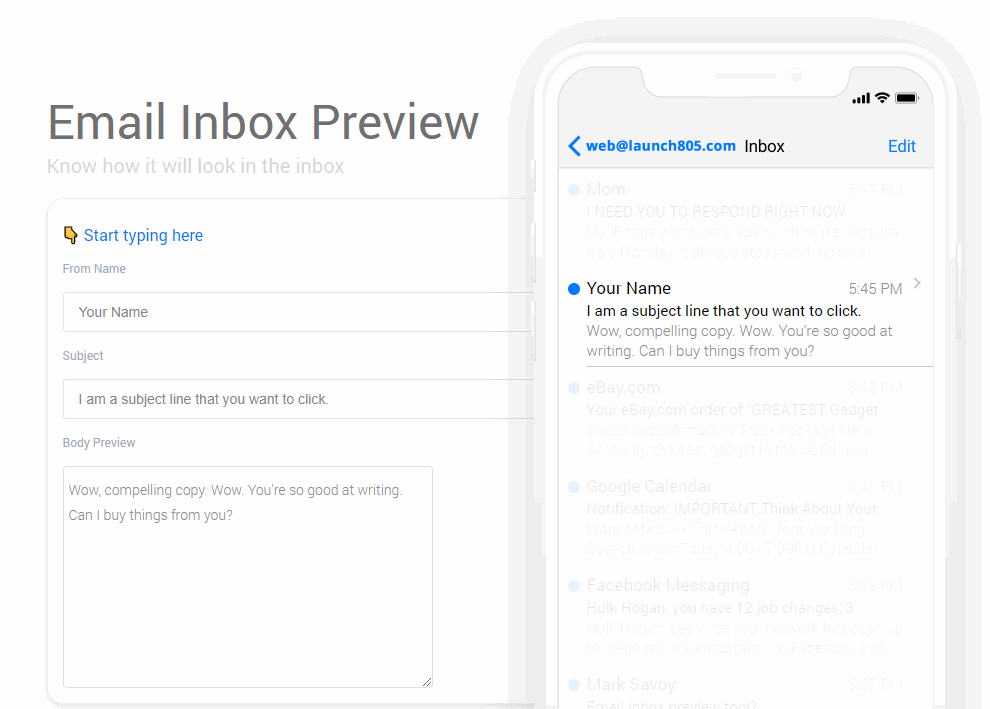
10. Use this inbox preview tool

Use this free tool that I created. I personally scripted an email subject line visualization tool to give both myself, and my clients a better idea of how the email subject line will look on mobile phones.

In mobile view, less characters are visible on the screen, hence, consider using that virtual real estate wisely!

Click the banner below to use the tool.

screenshot3102H0311

Finally, if your emails aren’t being opened, they aren’t being used. You’ve got great material to share; now it’s up to you to prove it in the subject line! 

How Evolving User Patterns Drive New Ad Experiences On YouTube

At YouTube, we’re on a constant quest to give people the perfect viewing experience. But over the years, what that looks like has changed significantly.

The way we watch video is always changing. And we want to keep advertisers abreast of these trends, with new ad experiences molded to the new ways people watch. This was the spirit behind our introduction of six-second bumper ads more than two years ago–as a response to the increasingly mobile habits of our users.

Today we’re highlighting how we’re adapting to three new trends in the user experience.

Longer viewing sessions

Our recent user experience research suggests that in addition to factors such as the length of ads, viewers are quite sensitive to the frequency of ad breaks, especially during longer viewing sessions. Through this research, we also learned that fewer interruptions is correlated with better user metrics, including less abandonment of content and higher rates of ad viewing. To respond to this, we will begin testing ad pods–two ads stacked back to back, where viewers have the option to skip directly to the content if it’s not the right ad for them.

Why does this solution make sense? Because when users see two ads in a break, they’re less likely to be interrupted by ads later. In fact, those users will experience up to 40 percent fewer interruptions by ads in the session.1 Early experiment results also show an 8-11 percent increase in unique reach and a 5-10 percent increase in frequency for advertisers, with no impact on Brand Lift metrics.2 This new experience, launching on desktop this year then followed by mobile and TV screens, aims to accommodate viewer preferences while continuing to help advertisers connect with their most important audiences.

More self-directed discovery

The way users prefer to find videos to watch is also changing. Remember back when the only YouTube videos you’d watch came in the form of a shared URL from a friend? Over the years, video viewing on YouTube has become more self-directed, as more viewers than ever before hop into their home or trending feeds and scroll to find a recommended video. In fact, over the last three years, watch time from content users discover on the YouTube homepage has grown 10X.3 That’s why we brought TrueView video discovery ads to the YouTube home feed, along with the Masthead and Universal App campaign ads. The YouTube home feed continues to be a great place for users to discover their next favorite creator, and now it can be a great place for them to discover your brand.

Watching on TV screens

We’re seeing incredible watchtime growth on TV screens: on average, users watch over 180 million hours of YouTube on TV screens every day.4  Last month, we introduced the TV screen device type in Google Ads and Display & Video 360, allowing you to tailor your campaigns for connected TVs – for example, by using a different creative or setting a specific device bid adjustment – and see reporting for ads that run on TV screens.

In the face of these burgeoning user trends—as well as the next wave, and the next—we’ll continue working to build the ideal video viewing experience, and keep thinking up ways to deliver value for our advertiser partners.

Source: Official Google Webmasters Blog

Protecting What We Love About The Internet: Our Efforts To Stop Online Piracy

The internet has enabled people worldwide to connect, create and distribute new works of art like never before. A key part of preserving this creative economy is ensuring creators and artists have a way to share and make money from their content—and preventing the flow of money to those who seek to pirate that content. Today, we’re releasing our latest update on those efforts.

Our 2018 “How Google Fights Piracy” report explains the programs, policies, and technology we put in place to combat piracy online and ensure continued opportunities for creators around the world.

We invest significantly in the technology, tools and resources that prevent copyright infringement on our platforms. We also work with others across the industry on efforts to combat piracy. These efforts appear to be having an effect: around the world, online piracy has been decreasing, while spending on legitimate content is rising across content categories.

Here are a few of our findings from this year’s Piracy report:

  • $3 billion+:The amount YouTube has paid to rights holders who have monetized use of their content in other videos through Content ID, our industry-leading rights management tool.
  • $100 million+: The amount we’ve invested in building Content ID, including staffing and computing resources.
  • $1.8 billion+The amount YouTube paid to the music industry from October 2017 to September 2018 in advertising revenue alone
  • 3 billion+:The number of URLs that were removed from Search for infringing copyright since launching a submission tool for copyright owners and their agents.
  • 10 million+The number of ads that were disapproved by Google in 2017 that were suspected of copyright infringement or that linked to infringing sites.

As we continue our work in the years ahead, five principles guide our substantial investments in fighting piracy:

Create more and better legitimate alternatives: Piracy often arises when it’s difficult for consumers to access legitimate content. By developing products that make it easy for users to access legitimate content, like Google Play Music and YouTube, Google helps drive revenue for creative industries and give consumers choice.

Follow the money: As the vast majority of sites dedicated to online piracy are doing so to make money, one way to combat them is to cut off their supply. We prevent actors that engage in copyright infringement from using our ads and monetization systems and we enforce these policies rigorously.

Be efficient, effective, and scalable: We strive to implement anti-piracy solutions that work at scale. For example, as early as 2010, we began making substantial investments in streamlining the copyright removal process for search results. As a result, these improved procedures allow us to process copyright removal requests for search results at the rate of millions per week.

Guard against abuse: Some actors will make false copyright infringement claims in order to have content they don’t want online taken down. We’re committed to detecting and rejecting bogus infringement allegations, such as removals for political or competitive reasons.

Provide transparency: We’re committed to providing transparency. In our Transparency Report, we disclose the number of requests we receive from copyright owners and governments to remove information from our services.

Today, our services are generating more revenue for creators and rights holders, connecting more people with the content they love, and doing more to fight back against online piracy than ever before. We’re proud of the progress this report represents. Through continued innovation and partnership, we’re committed to curtailing infringement by bad actors while empowering the creative communities who make many of the things we love about the internet today.

Source: Official Google Webmasters Blog

Drive Better Results: An Insider’s Look At The Latest Google Ads Innovations

With the busy holiday season ahead, we’re investing in new ways to help you work smarter and exceed your omnichannel goals. Check out the innovations we unveiled today at SMX East.

Easier ways to manage your messages

It’s no surprise that messaging has become a big part of our modern lives. If you’re inviting a friend to “Friendsgiving” dinner, you’re probably sending a quick text message. In the coming weeks, we’re rolling out two improvements to click-to-message ads:

  • Email forwarding sends text messages to your email, so you don’t need to provide a phone number to use message extensions. Responding to the email will automatically send a text reply back to your customer.
  • Automatic reply sends a preset message back to customers as soon as they message you. For example, you can automatically reply with, “Thanks for your message. We’ll get back to you within the hour.”

To help measure the success of your click-to-message ads, we’re expanding message reporting to include message conversions. You’ll be able to define the number of user-initiated exchanges needed to count as a conversion. For example, if it typically takes two or more exchanges before a customer orders a holiday dinner from your restaurant, you can set that as your conversion threshold.

“Using message extensions, we can offer fast assistance when our busy customers are looking for a style recommendation or opinion on fit, and can easily share images and links. Now, message reporting will help us analyze which parts of our campaigns are driving the most in-depth, valuable conversations with stylists, and where we can improve performance.” – Michaella Kurdziel, Director of Experience Excellence & Learning at MM.LaFleur

Take action on your data across online and offline channels

Most customer journeys still end in store, and 61% of shoppers would rather shop with brands that have a physical location than ones that are online only.1 Businesses need to measure the offline impact of digital advertising in order to take action on omnichannel behavior: store visits measurement is one way to do that. As a reminder, store visits are estimates based on data from users that have turned on Location History. Only aggregated and anonymized data is reported to advertisers, and they aren’t able to see any store visits from individual website visits, ad clicks, viewable impressions, or people.

To help you take action on store visits, we’re bringing these insights to data-driven attribution and Smart Bidding which use machine learning to help you improve performance. Data-driven attribution helps you understand which keywords, ads, ad groups, and campaigns have the greatest effect on your business goals. You can use this information to drive more conversions using Smart Bidding.We’re also adding more ways to measure the full value of your marketing. In the coming weeks, Store Visits in Google Analytics will start rolling out to eligible advertisers to connect store visits to other marketing efforts that bring customers to your website and then to your store.

One example of a business measuring the online to offline impact of its marketing is department store JCPenney. JCPenney had long recognized that digital campaigns led to store visits but wasn’t able to attribute those visits to specific channels. With Store Visits in Google Analytics, JCPenney was able to look at store visits and visit rate by channel to understand which online marketing channels were most effective in driving in-store visits, and efficiently scale investment in those channels.

We hope these new products can simplify your day-to-day and improve performance across your Google Ads campaigns during the holiday season and beyond.

Source: Official Google Webmasters Blog

From Discovery To Click, New YouTube Ads Capabilities For More Effective Video Storytelling

The heightened role of video throughout today’s consumer journey is an exciting opportunity for marketers to build connections that drive better business outcomes. At Advertising Week New York, we’re announcing new ways for marketers to become more effective full-funnel storytellers using the combined power of YouTube’s creative canvas with Google’s machine learning and measurement solutions.

Help viewers take action with extensions

Soon you’ll be able to make your video ads more actionable with a greater variety of ad extensions. Similar to extensions on Search ads, extensions on YouTube enhance your video ad with additional useful information—giving consumers more reasons to take action. You can already add location and form extensions (currently in beta) to your TrueView in-stream ads. Now we’re exploring additional use cases that encourage viewers to complete lower-funnel actions like finding the next movie showtime, downloading an app or booking a trip.

Brands like Vodafone, Chili’s, 20th Century Fox, Headspace and Maybelline are already using extensions for video ads to bring more relevance to their mobile ads and drive impact on the metrics that matter most. Using extensions, Vodafone drove a 2.3x incremental lift in Ad Recall and a 3.5 percent CTR—a 785 percent increase over their regional benchmark.

Measure the full impact of your video campaign

Video storytelling isn’t just about driving short-term campaign wins—it’s also about driving measurable results at every stage of the consumer journey. We know this is easier said than done, which is why we’re evolving our Brand Lift solution and partnering with IRI to make it simpler for advertisers to measure and act upon upper- and lower-funnel metrics.

Based on your feedback, soon you’ll be able to set up Brand Lift studies directly in Google Ads or Display & Video 360 and conveniently view reporting alongside your other ad metrics. We’ve also started sending Brand Lift surveys continuously throughout the duration of your campaign so you can understand how your video ads are influencing viewer perceptions in near real time. Additionally, we’ve introduced two new metrics: lifted users, the number of people who were influenced by your ad, and cost-per-lifted-user to make it easier for you to optimize your campaign’s effectiveness and cost-efficiency. To get the most out of these new measurement tools, we recommend using Maximize Lift bidding.

We’re also ramping up our investments in Google Measurement Partners to ensure our advertisers can measure YouTube media with measurement solutions that meet rigorous, verified standards. We work closely with partners to ensure their solutions respect user privacy. In addition to Nielsen Catalina Solutions (NCS) and Oracle Data Cloud, soon CPG advertisers will have the option to measure their YouTube media using IRI. These offerings complement geo experiments with Nielsen MPA, giving advertisers a variety of options for seeing the offline impact of their video ads. Last week we also announced expanded integrations for brand suitability and reach reporting, continuing our commitment to providing both quality and choice when it comes to helping marketers better understand their media investments.

We’re excited about how these capabilities can help take your campaigns to the next level, driving real business impact all along the customer journey.

Source: Official Google Webmasters Blog

New MRC Accreditations And Partners For Google And YouTube Ads Measurement

Is my marketing working? It sounds like a simple question, but in today’s complex environment, answering it correctly is a challenge. To help advance advertising measurement, we’ve invested in third-party accreditations through the Media Rating Council (MRC), and partnerships with leading measurement technology providers. Together, these efforts help ensure that the metrics our advertising solutions deliver are trusted, align with industry standards, and can be compared across providers.

Today, we’re announcing new MRC accreditations across Google advertising products, including Google Ads, Google Marketing Platform (specifically Display & Video 360 and Campaign Manager), and Google Ad Manager.1

We’ve also made progress with Google Measurement Partners for viewability, brand safety, and reach reporting on YouTube.

Trusted metrics across Google’s advertising solutions

Advertisers consistently tell us that they struggle with comparing media placements to determine where to invest their limited marketing resources. It’s a problem that’s made even worse when media providers use different definitions of commonly accepted metrics like clicks, impressions, and viewable impressions.

By endorsing the MRC standards and Interactive Advertising Bureau (IAB) guidelines for media measurement, we stand on the side of marketers, who deserve transparency and fairness in their media buys.

Below, you’ll see the comprehensive list of MRC accreditations we currently maintain across search, display, and video ads on the web and in apps. Accredited metrics include various aspects of our clicks, served impressions, viewable impressions, and invalid traffic detection and filtration. 

With today’s announcements, YouTube video ad impressions and viewability metrics for desktop, mobile web, and mobile in-app are now fully MRC accredited in Google Ads, Display & Video 360, and Campaign Manager. And we’ve begun the audit process for MRC accreditation of recently added metrics, including brand safety and Unique Reach reporting on YouTube in Google Ads.

“Google has consistently demonstrated a commitment to helping advertisers and publishers achieve transparency and quality in measurement through its work with the MRC. In addition to submitting products for initial consideration for MRC accreditation, Google also has expanded on the scope of what’s being submitted for existing accredited products. This progress is emblematic of what we at MRC consider to be our core industry mission: to help lift the bar for quality in measurement consistently upward.”

—George Ivie, CEO and Executive Director, Media Rating Council

“Google’s efforts to create transparency and choice through MRC accreditation demonstrates their commitment to delivering a better, more responsible advertising ecosystem. The ultimate goal is to ensure transparency at every step in the complex advertising supply chain, and Google’s efforts are helping us achieve that objective.”

—Bob Liodice, CEO, ANA

More transparent YouTube measurement with trusted partners

To help advertisers measure YouTube media in a verified, privacy-safe way with the measurement solution of their choice, we’ve also made progress with Google Measurement Partners for viewability, brand safety, and reach reporting.

First, the YouTube data feed for video viewability reporting by third-parties is currently under audit by the MRC. Our ultimate goal is to achieve MRC accreditation for our integrations with DoubleVerify and Integral Ad Science (IAS), so advertisers can be confident that YouTube metrics have been third-party verified, no matter where they choose to measure.

In addition, brand safety verification on YouTube by both DoubleVerify and IAS is now in expanded beta. In beta tests with DoubleVerify and IAS, we’re seeing 99 percent success rates on brand safety across both auction and reserve, including Google Preferred.2

We’re also expanding our partnerships for reach measurement, which now include Nielsen, comScore, Kantar, and soon, Meetrics. This month, YouTube’s integration with Nielsen for mobile in-app measurement has expanded to Australia and Italy. This is in addition to the U.S., Canada, Japan, U.K., Germany, and France which are already available.

To know if their marketing is working, advertisers need access to accurate, timely metrics they can trust, regardless of which measurement provider they choose. Looking to the future, we’ll continue investing in measurement solutions and partnerships that help advertisers understand and compare the impact of their investments using commonly accepted metrics and standards.

Source: Official Google Webmasters Blog

1 6 7 8 9 10 11 12 31